In-App Chat

Add chat to a peer-to-peer payment app

Log in as two users on two simulated phones, send and request money, and chat about it in the same conversation. Built with Next.js and the PubNub Chat SDK.

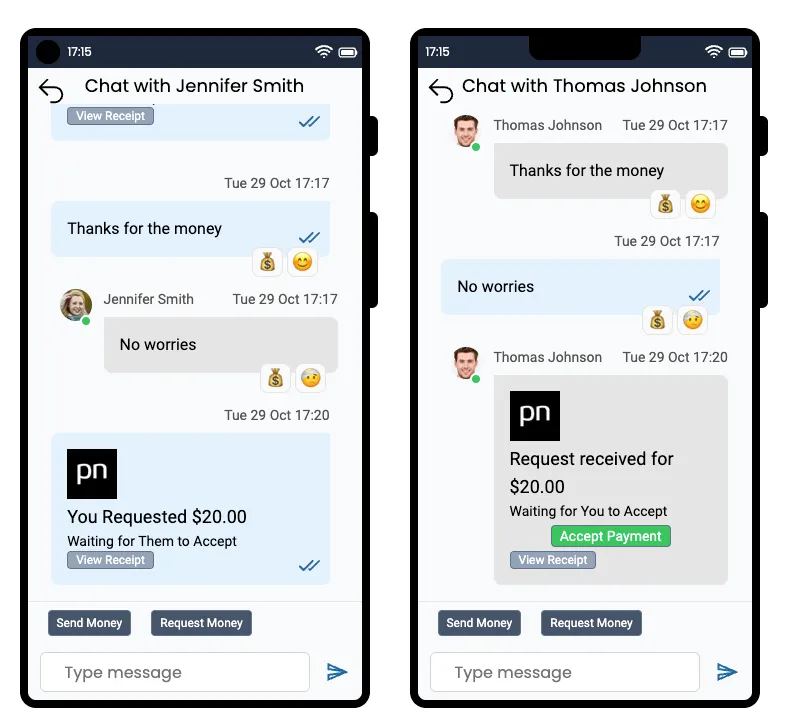
Two simulated phones in the Peer-to-Peer Payment demo: a chat between two users with text messages, emoji reactions, read receipts and a $20.00 money request waiting to be accepted
About this demo

Payments and chat in one conversation

This demo shows the real-time layer of a peer-to-peer payment app. The page shows two simulated phones side by side. Pick a different user on each one, and you can send money, request money, and chat between them without opening a second tab. The money is not real: balances are kept in the browser, and you can top up or log out to reset them. A real app would move the money in its own backend.

The app is built with Next.js and the PubNub Chat SDK. The two users talk in a direct (1:1) channel. Payments are messages on that channel, with the amount and a transaction ID in the message metadata, so payments and chat share one history. The sample users and their phone numbers are stored in App Context, and each login gets an Access Manager token. The push notifications in the demo are simulated in the page. The source code is open on GitHub.

Features

What you can do

  • Send and request money

    Open Send Money or Request Money, set the amount, and pick the other user. The payment is sent as a message on your direct channel and shows up on the other phone right away. If they are not in the chat, they get a simulated push notification.

  • Attach an image to a payment

    Choose an optional image before you send. It is uploaded with File Sharing and shown inside the payment message on both phones.

  • Accept a payment and view the receipt

    The recipient taps Accept. The app starts a message thread on the payment, both phones switch to "Transfer accepted", and both balances update. Tap View Receipt to see the amount, the reference, and whether the transfer is pending or completed.

  • Chat next to your payments

    Send text messages in the same conversation as the payments. A typing indicator shows when the other user is writing, and opening the chat loads its recent history from Message Persistence.

  • React to messages and payments

    Hover over a message or a payment and pick an emoji. The reaction and its count appear on both phones. Tap it again to remove it.

  • See when a message is read

    When the other user opens the chat, your messages get a read mark. Read receipts update live and are fetched again when you log back in.

Build it yourself

Make your own payment chat

Clone the app, add your PubNub keys, and run it locally.

GitHub

PubNubDevelopers/fintech-demo

The complete source. Enable Message Persistence, App Context, and File Sharing on your keyset, copy .env.sample to .env with your publish and subscribe keys, then run yarn install and yarn dev.

git clone https://github.com/PubNubDevelopers/fintech-demo.git
View on GitHub
Keep building

Build interactive real-time experiences with PubNub

Bring chat, live updates, and real-time interactions into your application without building the infrastructure from scratch.