Virtual Events

Add live chat to a video stream

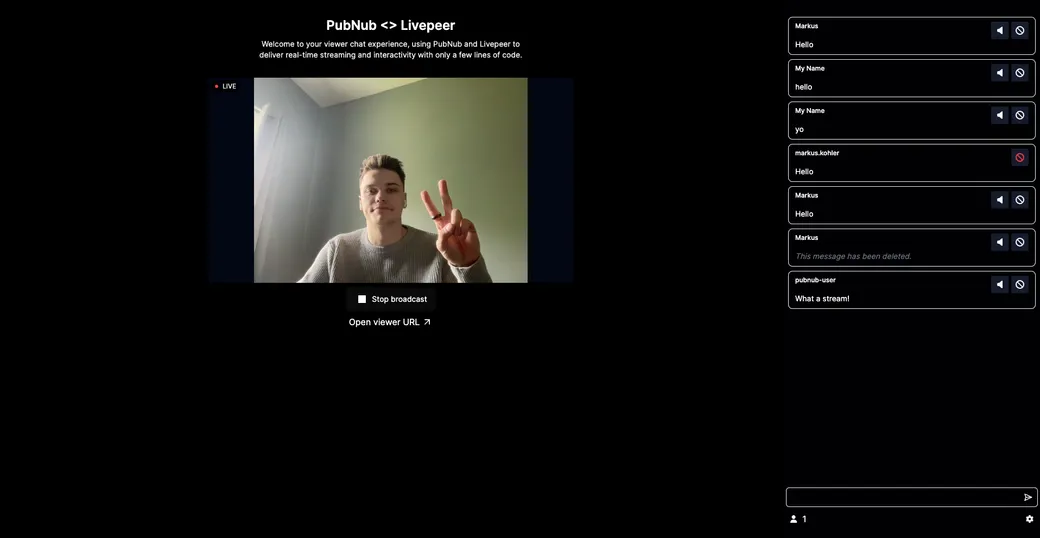
Create a stream as the host, open the viewer link, and chat with your audience next to the video. Viewers can report messages and users to the host. Built with Next.js and the PubNub Chat SDK.

The Live Events demo host view: the broadcast preview on the left and the stream chat on the right
About this demo

The chat layer around a live stream

This demo pairs a video stream with a real-time chat. The video comes from Livepeer, the video provider the demo integrates with. Everything around the video, the chat, the user profiles, and the reports, runs on PubNub. The web app is built with Next.js and the PubNub Chat SDK.

The page you start on is the host view. When you create a livestream, the app gets a playback ID from Livepeer and uses it as the ID of a public chat channel. Viewers who open the viewer link sign in with a username, which is saved as their App Context profile, and join the same channel. Mute, ban, and message deletion need your secret key, so the app sends them to a separate server; the README includes sample code for it. The source code is open on GitHub.
Features

What you can do

  • Host a stream with its own chat

    Click "Create a livestream" to open the host view. The stream's playback ID becomes a public chat channel, created with the Chat SDK the first time anyone joins.

  • Join as a viewer

    Open the viewer link in a new tab and sign in with a username. Your name is saved in your App Context user profile, so other people see it next to your messages.

  • Chat with the host and other viewers

    Send a message from either window. It appears in every open chat for that stream right away, with the sender's name.

  • Catch up on earlier messages

    When you join, the chat loads the latest messages from Message Persistence. Scroll to the top to load older ones.

  • Report messages and users

    As a viewer, open the menu on a message and report the message or its author. The host sees a flag count on the message and a list of flagged messages and users in the moderation panel.

Build it yourself

Make your own live events app

Clone the app, add your PubNub and Livepeer keys, and run it locally.

GitHub

PubNubDevelopers/Live-Events-Demo

The complete source. Enable Presence, Message Persistence, and App Context on your keyset, rename .env.example to .env and add your PubNub keys and Livepeer API key, then run npm install and npm run dev.

git clone https://github.com/PubNubDevelopers/Live-Events-Demo.git
View on GitHub
Keep building

Build interactive real-time experiences with PubNub

Bring chat, live updates, and real-time interactions into your application without building the infrastructure from scratch.