PubNub DataSync vs. real-time databases: Where your app's live state belongs

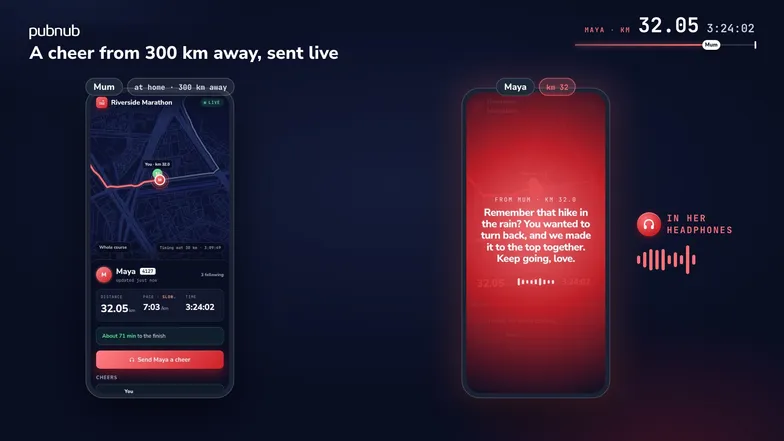
Marathon runners use apps to track their position and updates in real time to ensure fair races, track distance, and notify loved ones of their position. During the race, every runner's phone wants the same few facts at once. Where is each runner, how fast are they going, and who just cheered for them? Phones join late, drop out in the crowd at the finish, and come back. Keep that state in the wrong place and you either run a database and catch-up code for data that only matters on race day, or lose records you need next year. This post shows when PubNub DataSync fits, when a real-time database fits, and when to use both.
You can keep that state in a real-time database or in PubNub DataSync. In an app like this, a database would hold each runner's record along with everything that has to outlast race day, such as registrations and results. PubNub DataSync keeps your app's live state on PubNub, next to your Pub/Sub channels. It checks each write against a schema and the caller's token, stores it, and publishes the change as an event.
A real-time database can hold that state too, but how do you know when to use a database vs DataSync, or both? We'll dive into the differences between the two ways of managing this state with the Riverside Marathon demo, where we'll follow the runner Maya as she runs her first marathon while friends and family follow her on their phones. Make sure to install the code on your local machine to follow along and even enhance the demo with your own changes.
How they compare

Both store state and push changes to clients. They differ in how long records live, what you can query, and where permissions are enforced.
- How long records live. A real-time database keeps a record in its own data model until you delete it. DataSync stores typed entities that expire, 31 days after creation by default.
- What you can query. A real-time database gives you rich queries across your data. DataSync reads one entity by id, or a filtered list of one class.
- Where permissions are enforced. With a real-time database, you write the rules. DataSync checks the token on every request, and a projection decides which fields that token can read or write.
- What happens after a disconnect. A real-time database often keeps a local cache on the device and syncs it back. A DataSync client reads the record again when it reconnects.
- What it shares with the rest of your app. DataSync uses the same keyset, SDK and tokens as Pub/Sub.
When DataSync is the better fit
Fields that different people may see or change. A projection is a named set of fields, and each token reads or writes through one.

Sam, Maya's friend, can see that her mum cheered at km 32, but not what she said. His token reads the cheer through the default projection, which leaves out the words, and Maya's token reads it through the private projection, which includes them. Leo, another runner, tries to record a finish he hasn't run by writing officialKm directly. DataSync refuses it with a 403 DS-0202 because that field isn't in his phone's projection. Only the organiser's server can write it. The server sets these field permissions when it grants a token. Local mode does that in lib/server/pubnub.ts; the hosted demo delegates it to the shared Access Manager.
Phones that drop out and come back. DataSync doesn't send missed events again, and the app doesn't need them.

Sam's phone receives two of Maya's writes, then loses signal in the crowd and misses the next nine. While it's offline, it keeps showing her last known position. When it reconnects, it reads runner.maya once and shows her at 40.32 km, and live events take over from there.
Apps already on PubNub. DataSync keeps state on the same keyset as your Pub/Sub channels, with the same SDK and tokens.
Message, state or record?

The demo sorts its data by asking whether a phone that opens the app later needs it. The notice that Maya's mum just cheered only matters to whoever is listening, so it's a Pub/Sub message. The cheer itself is a DataSync record, so a supporter who opens the app later still sees it. Maya's position matters to anyone who opens the race today, so it's state in DataSync. Her finishing time matters next year, so it belongs in the organiser's database.
What DataSync does with one write

Maya's phone sends one PATCH to her Runner record every five seconds. DataSync checks it against the class schema and her token, stores the result, and publishes an event on the record's channel. Each supporter's phone subscribes to that channel, and the event carries the record's current state, so all three phones show her at the same distance. A write that fails a check gets a 400 or a 403, and nothing from it is stored. The error codes page lists each one.
PubNub runs the store, the checks, and the events. Your server grants the tokens, and in the demo it also writes official times.
When you still want a real-time database
- Records that must last. DataSync records expire. The demo's expire two days after they're created.
- Queries across your data. Reports, analytics and search are database work. DataSync reads one record by id or lists one class through a filter.
- Writes with no connection. If a device must queue writes offline for hours, use a database with an offline-first client.
- Large data that changes slowly. Keep it where it is, and move only the part that clients watch live.
The DataSync launch post describes the same split: keep existing systems for accounting, analytics, reporting and other back-office work.
Using both
In a real marathon, registrations, bib numbers and past results sit in the organiser's database. On race day, each runner's live record sits in DataSync. When a runner crosses a timing mat, the organiser's server writes her official time to her DataSync record, and supporters' pages show it. The same request could write the result to the database.
The runner's own record of the run goes elsewhere too. After finishing a GPS run with End run, the runner can save a timestamped GPX file. The phone records the full track locally; DataSync holds the simplified trail used by supporters' maps. With a configured Strava API app, the runner can connect an account and upload the GPX. Without that configuration, GPX download still works. Simulated runs can be downloaded with a simulated label; their finish screen offers no Strava upload button.
Try the marathon demo
A real-time database is a database first, with rich queries, long-lived records and, often, an offline cache on the device. DataSync is PubNub's real-time data store for application state, and it checks each write against a schema and the caller's token before it stores the write and publishes the change. Use DataSync for live state that many clients watch, especially if your app already uses PubNub, and keep a database for records that must last, queries across records, and writes made offline. Many apps use both, as this marathon does.
Get started today by installing the DataSync demo and see how DataSync can store and synchronize application data directly on PubNub and keep every connected client up to date in real time, without adding an external database or building your own sync layer. You'll need to create a PubNub account, check DataSync availability and current quotas for your account, then follow the DataSync documentation to set up your keyset.