
PubNub Illuminate Query Builder: Turn live performance signals into action
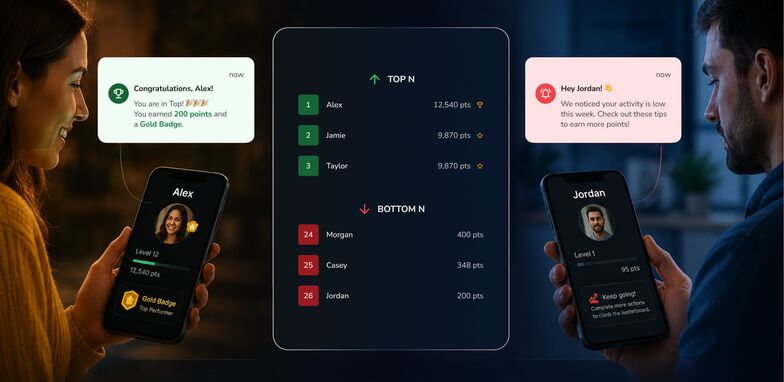
Every real-time app creates a live trail of activity: messages sent, deliveries completed, support responses handled, engagement events triggered.
Identifying patterns in that trail is only useful if you can respond immediately. Exporting data or running reports later means the opportunity to act has already passed; the signal has gone stale.
With PubNub Illuminate’s Query Builder, you can rank activity using Top N and Bottom N queries and trigger actions automatically using Decisions. Live signals can create new engagement before the calls go cold. Reward top performers, encourage participation, or respond to operational issues while activity is still happening with Illuminate Query Builder.
Illuminate turns streaming data into automated workflows using a simple model:
- Queries detect patterns
- Decisions evaluate them
- Actions respond automatically
Turn real-time activity into performance rankings
Illuminate’s Query Builder includes predefined ranking queries that help you surface performance patterns without writing code.
Two common ranking patterns include Top N and Bottom N queries.
Top N queries identify the highest performers or most engaged users in your system. Examples include:
- Rewarding the top 10 most engaged fans during a live event
- Highlighting the fastest delivery drivers
- Recognizing support agents resolving the most tickets
Bottom N queries surface users or events that may need attention or incentives. Examples include:
- Identifying least engaged users and encourage participation
- Detecting slow delivery response times
- Flagging long support resolution times
Once these rankings are detected, they can be used in Decisions to trigger automated responses.
Cross-vertical real-time ranking in action
Live events and fan engagement
During a live stream or digital event, a few highly active participants often drive the energy in the room.
With a Top N query, builders can surface the most engaged viewers based on messages, reactions, or participation, then automatically trigger actions like awarding badges, spotlighting fans during the stream, or unlocking exclusive perks.
Bottom N queries help you explore the other side of engagement, identifying viewers who may be drifting so you can bring them back with prompts, incentives, or personalized nudges.
Delivery and logistics
In delivery operations, every moment matters. Investigating and rewarding efficiency instantly drives smooth ops and speedy support for roadblocks.
Using Top N queries, teams can highlight drivers completing deliveries the fastest and reward strong performance.
Bottom N queries can surface drivers experiencing delays or longer completion times so operations teams can investigate issues quickly or route additional support.
Customer support operations
For support teams, response and resolution time are critical performance metrics for smooth CX operations.
With real-time rankings, teams can identify top-performing agents, detect slow responses early, and uncover opportunities for coaching or process improvements.
Instead of waiting for reports or dashboards, insights appear instantly and can trigger actions that craft a seamless customer service experience.
Set up ranking and actions in three steps
Setting up Top N or Bottom N ranking with Illuminate Query Builder takes just a few steps.
1. Access Query Builder and select a ranking query
Open Query Builder from the Business Object page once a Business Object is capturing data. Choose a Top N or Bottom N predefined query and give it a name.
Illuminate automatically maps relevant fields from your Business Object such as user identifiers, channels, or message content based on common field names like user, channel, or message.
You can customize how rankings are calculated based on your use case, including:
- the number of records captured
- the count of activities such as chat messages
- the average, sum, minimum, or maximum of numeric values like purchases or points
2. Select the time window and ranking criteria
Define the aggregation window for your ranking query, such as the last 10 minutes or the last hour.
You can also refine the query with filters or adjust the Top N or Bottom N value depending on how many results you want returned.
3. Create a Decision to trigger actions
Once the query is saved, you can create a Decision directly from the query.
Illuminate provides predefined decisions for Top N and Bottom N queries, automatically setting up the rule structure based on the ranking results.
From there, you can configure actions such as:
- rewarding top participants
- sending incentives to less engaged users
- triggering alerts or notifications
- activating personalized responses
Each row returned from the ranking query becomes a condition that can trigger an action.
Control how ties are ranked
When multiple users have the same score or activity level, Illuminate lets you choose how ties are handled.
- Sequential: Ranks increase by one after a tie. If four users share Rank 2, the next rank is 3. Actions run for all returned users.
- Competition: Ranks skip numbers after a tie. If four users share Rank 2, the next rank becomes 6. Actions run for all tied users.
- Unique: Returns exactly the number of results specified by N. When users tie, the message timestamp determines ordering so only the Top N or Bottom N users are returned.
Turn rankings into automated actions
Ranking data becomes far more valuable when it drives real-time responses.
In Illuminate, queries detect patterns in streaming data and Decisions use those results to trigger actions automatically. For example, you can:
- reward the most engaged users
- incentivize participation from less active users
- recognize high-performing teams or individuals
- detect operational slowdowns early
- personalize experiences dynamically
Instead of analyzing performance after the fact, Illuminate allows you to detect signals and respond automatically while the activity is happening.
Automate real-time actions with full control
Real-time systems generate rich data mines of user activity that often go unused. The key to unlocking the full power of your teams – and your apps – lies in turning that activity into signals that trigger action in an instant.
With Top N and Bottom N queries in PubNub Illuminate, you can identify the most and least active participants and use Decisions to trigger automated responses.
Whether you are rewarding engagement, improving operations, or optimizing service performance, Illuminate helps teams move from insight to action in real time. Try it now!
