Logging for Swift SDK
This page explains how to configure logging in the PubNub Swift Software Development Kit (SDK) using log levels and custom log writers.
For general logging concepts and best practices applicable to all PubNub SDKs, see Logging.
Logging architecture
The Swift SDK provides a flexible logging system with the following features:
- Built-in log writers: The SDK includes
OSLogWriter(recommended for iOS 14.0+, macOS 11.0+),ConsoleLogWriter, andFileLogWriter - Custom log writers: Implement the
LogWriterprotocol to route logs to external monitoring services, databases, or analytics platforms - Multiple log writer support: Use built-in and custom log writers simultaneously. All registered log writers receive the same log entries
- Structured log messages: Each log includes a PubNub instance identifier, timestamp, log level, category, and typed content
- Log categories: Organize logs by type (Networking, PubNub, Crypto, EventEngine)
Logging is disabled by default (LogLevel.none) to optimize performance in production environments.
Enable logging
Configure logging when creating your PubNub client by providing a PubNubLogger instance:
1
Log levels
The SDK uses standard log levels represented as bitmasks. Each level controls the amount of detail captured.
| Log Level | Bitmask | Purpose |
|---|---|---|
LogLevel.none | 0 | Logging is disabled. Default setting. |
LogLevel.trace | 1 << 0 | Internal operations: method calls, state-machine transitions, and detailed execution flow. |
LogLevel.debug | 1 << 1 | User inputs, API (Application Programming Interface) parameters, HTTP (Hypertext Transfer Protocol) requests and responses, and operation results. |
LogLevel.info | 1 << 2 | Significant events including successful initialization and configuration changes. |
LogLevel.event | 1 << 3 | Internal PubNub operations or events. |
LogLevel.warn | 1 << 4 | Unusual conditions, and non-breaking validation warnings. |
LogLevel.error | 1 << 5 | Errors, exceptions, and configuration conflicts. |
LogLevel.all | UInt32.max | All log levels will be captured. |
Logging sensitive information
The trace and debug settings may log sensitive information including API keys, user identifiers, message content, complete request URLs (with Access Manager auth tokens attached as query parameters), and the full token string returned by grantToken calls. Use these levels only in development environments. Never enable trace or debug logging in production environments with sensitive data.
Set log levels
Configure log levels by assigning the levels array property of PubNubLogger to your desired log levels, as in the following examples.
Enable all logging
1
Enable only error logging
1
Enable non-debug level logging
1
Disable logging
1
Built-in log writers
OSLogWriter
Starting from version 9.0.0, the PubNub Swift SDK uses the OSLogWriter for logging, which integrates with Apple's native logging system.
1
OSLogWriter provides several advantages:
- Integrates with Apple's native logging system
- Better performance and security
- Proper handling of sensitive data
- Logs can be viewed in Apple's Console app
Minimum OS requirements
OSLogWriter requires iOS 14.0+, macOS 11.0+, watchOS 7.0+, or tvOS 14.0+. If your app supports earlier OS versions, you should use conditional checks as shown in the Enable logging example, which demonstrates how to use OSLogWriter on newer OS versions and fall back to ConsoleLogWriter and FileLogWriter on older versions.
ConsoleLogWriter and FileLogWriter
For apps that support earlier OS versions, the SDK provides ConsoleLogWriter and FileLogWriter:
ConsoleLogWriter: Prints log entries to the console usingprint()orNSLog()FileLogWriter: Writes log entries to disk with automatic rotation
Deprecation notice
ConsoleLogWriter and FileLogWriter are deprecated on iOS 14.0+, macOS 11.0+, watchOS 7.0+, and tvOS 14.0+. Use OSLogWriter instead for better performance and security.
Structured logging
The Swift SDK provides structured logging through the LogMessage protocol. Each log message contains typed content and metadata for better organization and analysis.
LogMessage structure
Each LogMessage includes these components:
| Property | Description |
|---|---|
timestamp | The date and time when the log was created (TimeInterval). |
pubNubId | The PubNub instance identifier. |
logLevel | The severity level: trace, debug, info, event, warn, or error. |
category | The log category: Networking, PubNub, Crypto, EventEngine, or None. |
location | Optional source class or method generating the log. |
type | The message content type: text, network-request, network-response, or object. |
message | The log payload (type depends on type field). |
details | Optional additional context. |
Custom log writers
Create custom log writers to route log entries to external monitoring services, databases, or analytics platforms. Custom log writers must implement the LogWriter protocol.
LogWriter protocol
The LogWriter protocol defines the requirements for a log writer:
1
Custom log writer example
Example of custom log writer usage:
1
Multiple log writers
Use the built-in log writers and custom log writers simultaneously:
1
The SDK sends every log entry that meets the minimum log level threshold to all registered log writers.
Log categories and filtering
PubNub logs are organized using categories for detailed classification:
| Category | Description |
|---|---|
Networking | Logs related to network operations |
PubNub | Logs related to method calls on the PubNub class object |
Crypto | Logs related to CryptoModule (encryption/decryption activities) |
EventEngine | Logs related to subscription and presence event workflow (when enableEventEngine is set to true) |
Filtering logs in Xcode
When using OSLogWriter, logs are integrated with Apple's native logging system, which allows for powerful filtering capabilities in Xcode's console and Apple's Console app.
While all log writers will record category information, the filtering capabilities in Xcode's console are only available when using OSLogWriter.
To filter logs in Xcode:
- Run your application in debug mode.
- Open the Xcode console.
- Use the search field to filter by subsystem (
com.pubnub) or category. - You can also use the built-in filter buttons in the console to focus on specific log types.
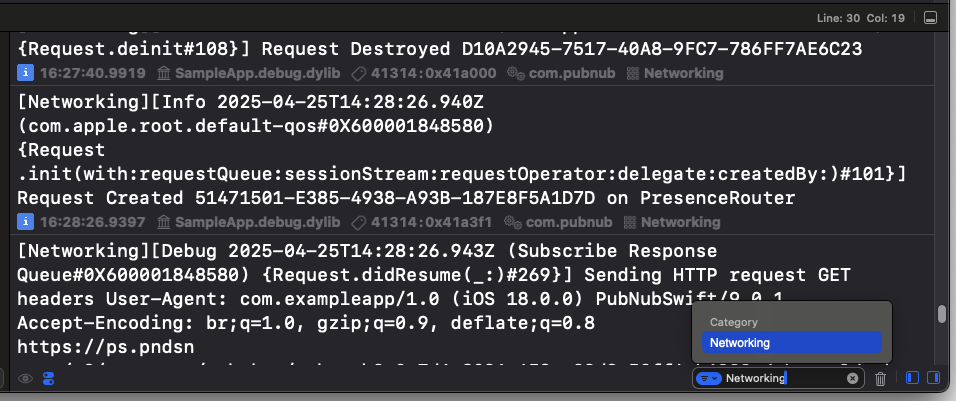
This filtering capability makes it much easier to debug specific aspects of the PubNub SDK's operation in complex applications.
Logging best practices
Use these recommendations for effective logging.
Choose the appropriate log level
| Environment | Recommended Log Level |
|---|---|
| Production | LogLevel.error to capture critical issues without performance impact. |
| Staging | LogLevel.info or LogLevel.event to monitor operational events. |
| Development | LogLevel.debug or LogLevel.trace to investigate issues and verify behavior. |
| Deep troubleshooting | LogLevel.all when working with PubNub support on complex issues. |
Protect sensitive data
Never enable LogLevel.debug or LogLevel.trace in production environments that handle sensitive information.
These levels may expose:
- API keys and authentication tokens
- User identifiers and personal information
- Message content and metadata
- Complete request URLs, including the Access Manager
authtoken attached as a query parameter - The full token string returned by
grantTokencalls, since response bodies are logged in full
Use OSLogWriter in production
Use OSLogWriter instead of ConsoleLogWriter or FileLogWriter in production apps.
Filter logs by instance identifier
Use the instance identifier to filter logs when debugging applications with multiple PubNub clients. Search for the instance identifier in Xcode's console to view logs from a specific instance.
Provide logs to support
When reporting issues to PubNub support, include complete logs:
- Set the log level to
LogLevel.debugorLogLevel.all. - Reproduce the issue.
- Collect logs from initialization through the problem occurrence.
- Include the PubNub SDK version.
For more information about configuration parameters, refer to Configuration.