Configuration API for Cocoa Swift SDK
Complete API reference for building real-time applications on PubNub with the Swift Software Development Kit (SDK). This page covers configuration, initialization, and event handling with concise, working examples.
This SDK has been replaced by a PubNub Swift SDK written purely in Swift. See the Swift SDK.
Configuration
PNConfiguration stores user-provided settings that define how the client behaves. The configuration includes properties to fine-tune the PubNub client.
Method(s)
To create configuration instance you can use the following function in the Swift SDK:
1public convenience init(publishKey: String, subscribeKey: String)
| Parameter | Description |
|---|---|
publishKey *Type: String | Your PubNub Publish Key. |
subscribeKey *Type: String | Your PubNub Subscribe Key. |
heartbeatNotificationOptionsType: PNHeartbeatNotificationOptions | These are bitmask options, they can be combined. When client instances are notified about heartbeat operations, this happens through the PNObjectEventListener callback for statuses. PNHeartbeatNotifySuccess: explicitly tells client to notify on successful heartbeat operations. PNHeartbeatNotifyFailure: explicitly tells client to notify on failed heartbeat operations (default is only this option) PNHeartbeatNotifyAll: This is a combination of PNHeartbeatNotifySuccess and PNHeartbeatNotifyFailure PNHeartbeatNotifyNone: This means the client will not provide any callback notifications for heartbeat operations |
stripMobilePayloadType: Bool | Stores whether client should strip out received messages (real-time and history) from data which has been appended by client (like mobile payload for mobile push notifications). |
cipherKeyType: String | Key which is used to encrypt messages pushed to PubNub service and decrypt messages received from live feeds on which client subscribed at this moment. |
subscribeMaximumIdleTimeType: TimeInterval | Maximum number of seconds which client should wait for events from live feed. Default 310. |
nonSubscribeRequestTimeoutType: TimeInterval | Number of seconds which is used by client during non-subscription operations to check whether response potentially failed with timeout or not. Default 10. |
presenceHeartbeatValueType: Int | Defines how long the server considers the client alive for presence. This property works similarly to the concept of long polling by sending periodic requests to the PubNub server every 300 seconds by default. These requests ensure the client remains active on subscribed channels. If no heartbeat is received within the timeout period, the client is marked inactive, triggering a "timeout" event on the presence channel. |
presenceHeartbeatIntervalType: Int | Specifies how often the client will send heartbeat signals to the server. This property offers more granular control over client activity tracking than presenceHeartbeatValue. Configure this property to achieve a shorter presence timeout if needed, with the interval typically recommended to be (presenceHeartbeatValue / 2) - 1. Due to server constraints, don't set the value below 3. |
keepTimeTokenOnListChangeType: Bool | Whether client should keep previous timetoken when subscribe on new set of remote data objects live feeds. Default true. |
catchUpOnSubscriptionRestoreType: Bool | Whether client should try to catch up for events which occurred on previously subscribed remote data objects feed while client was off-line. Default true. |
applicationExtensionSharedGroupIdentifierType: String | Reference on group identifier which is used to share request cache between application extension and it's containing application. This property should be set to valid registered group only if PubNub client is used inside of application's extension (iOS 8.0+, macOS 10.10+). |
requestMessageCountThresholdType: UInt | Number of maximum expected messages from PubNub service in single response. |
maximumMessagesCacheSizeType: UInt | Messages de-duplication cache size. Default 100. |
completeRequestsBeforeSuspensionType: Bool | Whether client should try complete all API call which is done before application will be completely suspended. Default true. |
suppressLeaveEventsType: Bool | If true, the client shouldn't send presence leave events during the unsubscribe process. |
originType: String | If a custom domain is required, SDK accepts it here. To request a custom domain, contact support and follow the request process. |
Sample code
Required UUID
Always set the UUID to uniquely identify the user or device that connects to PubNub. This UUID should be persisted, and should remain unchanged for the lifetime of the user or the device. If you don't set the UUID, you won't be able to connect to PubNub.
1let config = PNConfiguration(publishKey: "demo", subscribeKey: "demo")
2self.client = PubNub.clientWithConfiguration(config)
3self.client.addListener(self)
Returns
Configured and ready to use client configuration instance.
Other examples
Configure heartbeat notifications
PNConfiguration
1let config = PNConfiguration(publishKey: "<pub key>", subscribeKey: "<sub key>")
2/**
3    This is where you need to adjust the PNConfiguration object for the types of heartbeat notifications you want.
4    This is a bitmask of options located at https://github.com/pubnub/objective-c/blob/1f1c7a41a3bd8c32b644a6ad98fe179d45397c2b/PubNub/Misc/PNStructures.h#L24
5    */
6config.heartbeatNotificationOptions = [.notifyAll]
7

8self.client = PubNub.clientWithConfiguration(config)
9self.client.addListener(self)
Listener
1func client(_ client: PubNub, didReceive status: PNStatus) {
2

3    if status.operation == .heartbeatOperation {
4

5        /**
6            Heartbeat operations can in fact have errors, so it is important to check first for an error.
7            For more information on how to configure heartbeat notifications through the status
8            PNObjectEventListener callback, consult http://www.pubnub.com/docs/sdks/objective-c/api-reference/configuration#configuration_basic_usage
9            */
10

11        if !status.isError { /* Heartbeat operation was successful. */ }
12        else { /* There was an error with the heartbeat operation, handle here. */ }
13    }
14}
Configuration update
PubNub client instance doesn't allow dynamic configuration update, but it has helper functions which allow to receive new instance with updated configuration. Updated configuration will be applied on PubNub client copy. Original instance after copy block will return shouldn't be used anymore.
Method(s)
To update client configuration you can use following functions in the Swift SDK:
Update client configuration with closure
1open func copyWithConfiguration(
2    _ configuration: PNConfiguration,
3    completion block: @escaping (PubNub) -> Swift.Void
4)
| Parameter | Description |
|---|---|
configuration *Type: PNConfiguration | Class Instance which stores the configuration settings which is used by the PubNub client. |
closure *Type: (PubNub) -> Void | Completion closure which is called at the end of update process, has one parameter - PubNub instance with updated configuration. |
Update client configuration with callback queue and closure
1open func copyWithConfiguration(
2    _ configuration: PNConfiguration,
3    callbackQueue: DispatchQueue?,
4    completion block: @escaping (PubNub) -> Swift.Void
5)
| Parameter | Description |
|---|---|
configuration *Type: PNConfiguration | Class Instance which stores the configuration settings which is used by the PubNub client. |
callbackQueueType: dispatch_queue_t | The GCD dispatch queue where callbacks and completion handlers will be called (asynchronously). |
closure *Type: (PubNub) -> Void | Completion closure which is called at the end of update process, has one parameter - PubNub instance with updated configuration. |
Sample code
Client configuration:
1// User authorized and we need to update used UUID
2let configuration = self.client.currentConfiguration()
3configuration.uuid = "AuthorizedUserID"
4self.client.copyWithConfiguration(configuration, completion: { (updatedClient) in
5

6    // Store reference on new client with updated configuration.
7    self.client = updatedClient
8})
Returns
Void
Initialization
Include the SDK with CocoaPods
Install the CocoaPods gem by following the procedure defined in the Getting Started guide. To add the PubNub SDK to your project with CocoaPods, there are four tasks to complete:
-
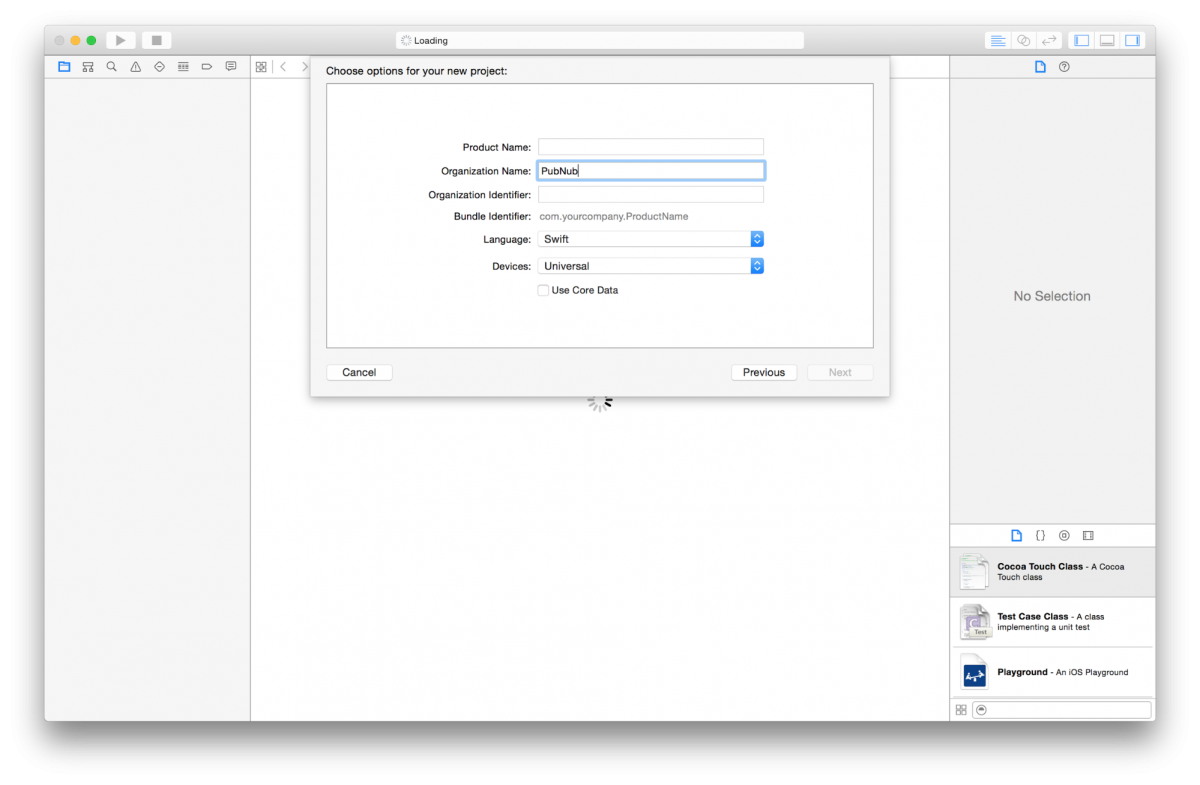
Create new Xcode project.
-
Create a Podfile in your newly created Xcode project root folder
1touch Podfile -
The PubNub client can be added as module (only with a deployment target of OS X 10.9 and above)
1source 'https://github.com/CocoaPods/Specs.git'
2platform :osx, "10.9"
3use_frameworks!
4

5target 'application-target-name' do
6    pod "PubNub", "~> 4.1"
7end
If you have any other pods you'd like to include, or if you have other targets you'd to add (like a test target) add those entries to this Podfile as well. See the CocoaPods documentation for more information on Podfile configuration.
-
Install your pods by running
pod installvia the command line from the directory that contains your Podfile.Work within the workspace
After installing your Pods, work within the workspace generated by CocoaPods or specified by you in Podfile. Always open the newly generated workspace file, not the original project file.
OS x 10.9 and above: complete the application delegate configuration
If the project's deployment target is set to OS X 10.9 and above, you will need to import the module named AppDelegate.swift:
Required UUID
Always set the UUID to uniquely identify the user or device that connects to PubNub. This UUID should be persisted, and should remain unchanged for the lifetime of the user or the device. Not setting the UUID can significantly impact your billing if your account uses the Monthly Active Users (MAUs) based pricing model, and can also lead to unexpected behavior if you have Presence enabled.
1import Cocoa
2import PubNubSDK // <- Here is our PubNub module import.
Common to all OS x versions: add the PNObjectEventListener protocol to the AppDelegate
1class AppDelegate: NSObject, NSApplicationDelegate, PNObjectEventListener {
2

3    // Stores reference on PubNub client to make sure what it won't be released.
4    var client: PubNub!
5

6    func applicationDidFinishLaunching(_ aNotification: Notification) {
7        ...
8    }
9}
Description
This function is used for initializing the PubNub Client API context. This function must be called before attempting to utilize any API functionality in order to establish account level credentials such as publishKey and subscribeKey.
Method(s)
To Initialize PubNub you can use the following method(s) in the Swift SDK:
Initialize PubNub
1open class func clientWithConfiguration(_ configuration: PNConfiguration) -> Self
| Parameter | Description |
|---|---|
configuration *Type: PNConfiguration | Class Instance which stores the configuration settings which is used by the PubNub client. |
Initialize PubNub with callback queue
1open class func clientWithConfiguration(
2    _ configuration: PNConfiguration,
3    callbackQueue: DispatchQueue?
4) -> Self
| Parameter | Description |
|---|---|
configuration *Type: PNConfiguration | Class Instance which stores the configuration settings which is used by the PubNub client. |
callbackQueueType: dispatch_queue_t | The GCD dispatch queue where callbacks and completion handlers will be called (asynchronously). |
Sample code
Initialize the PubNub client API
Required UUID
Always set the UUID to uniquely identify the user or device that connects to PubNub. This UUID should be persisted, and should remain unchanged for the lifetime of the user or the device. If you don't set the UUID, you won't be able to connect to PubNub.
1let configuration = PNConfiguration(publishKey: "demo", subscribeKey: "demo")
2configuration.TLSEnabled = true
3self.client = PubNub.clientWithConfiguration(configuration)
Returns
It returns the PubNub instance for invoking PubNub APIs like publish(), subscribeToChannels(), historyForChannel, hereNowForChannel.
Other examples
Initialize the client
Required UUID
Always set the UUID to uniquely identify the user or device that connects to PubNub. This UUID should be persisted, and should remain unchanged for the lifetime of the user or the device. If you don't set the UUID, you won't be able to connect to PubNub.
1let configuration = PNConfiguration(publishKey: "demo", subscribeKey: "demo")
2self.client = PubNub.clientWithConfiguration(configuration)
Initialization for a Read-Only client
In the case where a client will only read messages and never publish to a channel, you can simply omit the publishKey when initializing the client:
Required UUID
Always set the UUID to uniquely identify the user or device that connects to PubNub. This UUID should be persisted, and should remain unchanged for the lifetime of the user or the device. If you don't set the UUID, you won't be able to connect to PubNub.
1let configuration = PNConfiguration(publishKey: "", subscribeKey: "demo")
2self.client = PubNub.clientWithConfiguration(configuration)
Use a custom UUID
Set a custom UUID to identify your users.
Required UUID
Always set the UUID to uniquely identify the user or device that connects to PubNub. This UUID should be persisted, and should remain unchanged for the lifetime of the user or the device. If you don't set the UUID, you won't be able to connect to PubNub.
1let configuration = PNConfiguration(publishKey: "myPublishKey", subscribeKey: "mySubscribeKey")
2configuration.uuid = "myUniqueUUID"
3self.client = PubNub.clientWithConfiguration(configuration)
Initializing with SSL enabled
This examples demonstrates how to enable PubNub Transport Layer Encryption with SSL. Just initialize the client with ssl set to true. The hard work is done, now the PubNub API takes care of the rest. Just subscribe and publish as usual and you are good to go.
Required UUID
Always set the UUID to uniquely identify the user or device that connects to PubNub. This UUID should be persisted, and should remain unchanged for the lifetime of the user or the device. If you don't set the UUID, you won't be able to connect to PubNub.
1let configuration = PNConfiguration(publishKey: "demo", subscribeKey: "demo")
2configuration.TLSEnabled = true
3self.client = PubNub.clientWithConfiguration(configuration)
UUID
This function is used to set a user ID on the fly.
Method(s)
To set UUID you can use the following method(s) in Swift SDK:
1open var uuid: String
Sample code
Required UUID
Always set the UUID to uniquely identify the user or device that connects to PubNub. This UUID should be persisted, and should remain unchanged for the lifetime of the user or the device. If you don't set the UUID, you won't be able to connect to PubNub.
1// User authorized and we need to update used UUID
2let configuration = self.client.currentConfiguration()
3configuration.uuid = NSUUID().uuidString
4self.client.copyWithConfiguration(configuration, completion: { (updatedClient) in
5

6    // Store reference on new client with updated configuration.
7    self.client = updatedClient
8})
Other examples
Creating a function to subscribe a unique channel name
1/**
2 Subscription process results arrive to listener which should adopt to PNObjectEventListener protocol
3 and registered using:
4 */
5self.client.addListener(self)
6self.client.subscribeToChannels([NSUUID().uuidString], withPresence: false)
7
8// Handle new message from one of channels on which client has been subscribed.
9func client(_ client: PubNub, didReceiveMessage message: PNMessageResult) {
10
11 // Handle new message stored in message.data.message
12 if message.data.channel != message.data.subscription {
13
14 // Message has been received on channel group stored in message.data.subscription.
15 }
Initializing with a custom uuid
Required UUID
Always set the UUID to uniquely identify the user or device that connects to PubNub. This UUID should be persisted, and should remain unchanged for the lifetime of the user or the device. If you don't set the UUID, you won't be able to connect to PubNub.
1let configuration = self.client.currentConfiguration()
2configuration.uuid = "myUniqueUUID"
3self.client.copyWithConfiguration(configuration, completion: { (updatedClient) in
4

5    // Store reference on new client with updated configuration.
6    self.client = updatedClient
7})
Creating a unique auth_key for Access Manager on initialization
1let configuration = self.client.currentConfiguration()
2configuration.authKey = NSUUID().uuidString
3self.client.copyWithConfiguration(configuration, completion: { (updatedClient) in
4

5    // Store reference on new client with updated configuration.
6    self.client = updatedClient
7})
Authentication key
Setter and getter for users auth key.
Method(s)
1open var authKey: String?
Sample code
Set auth key
1let configuration = self.client.currentConfiguration()
2configuration.authKey = "my_new_authkey"
3self.client.copyWithConfiguration(configuration, completion: { (updatedClient) in
4

5    // Store reference on new client with updated configuration.
6    self.client = updatedClient
7})
Get auth key
1// Request current client configuration and pull out authorisation key from it.
2let authKey = self.client.currentConfiguration().authKey
Returns
Get Auth key returns the current authentication key.
Filter expression
Requires Stream Controller add-on
This method requires that the Stream Controller add-on is enabled for your key in the Admin Portal. See Enable the features your app calls.
To set or get message filters, you can use the following methods.
Method(s)
1open var filterExpression: String?
Sample code
Set filter expression
Required UUID
Always set the UUID to uniquely identify the user or device that connects to PubNub. This UUID should be persisted, and should remain unchanged for the lifetime of the user or the device. If you don't set the UUID, you won't be able to connect to PubNub.
1let configuration = PNConfiguration(publishKey: "demo", subscribeKey: "demo")
2self.client = PubNub.clientWithConfiguration(configuration)
3self.client.filterExpression = "(senderID=='PubNub')";
Get filter expression
1print("Filtering expression: \(self.client.filterExpression)")
Returns
Get Filter Expression returns the Current filtering expression.
Malformed filter expression
If filter expression is malformed, PNObjectEventListener won't receive any messages and presence events from service (only error status).