Illuminate REST API
The PubNub Illuminate REST API provides programmatic access to create, manage, and monitor your real-time analytics and decision-making infrastructure.
Overview
Use this API to define the data you capture (business objects), transform that data into aggregations (metrics / queries), make real-time decisions (decisions), and visualize everything (dashboards). The typical workflow is linear and repeatable across projects.
Quick start workflow
- Create a business object to describe which event fields you will ingest.
- Create a metric to aggregate those fields over a time window.
- Create a decision to evaluate conditions and trigger actions.
- Create a dashboard to visualize the metric and optionally overlay decision triggers.
Endpoint index
| Resource | Operation | Method | Endpoint | Docs |
|---|---|---|---|---|
| Business objects | Create | POST | /business-objects | Create business object |
| List | GET | /business-objects | List business objects | |
| Get | GET | /business-objects/{id} | Get business object | |
| Update | PUT | /business-objects/{id} | Update business object | |
| Delete | DELETE | /business-objects/{id} | Delete business object | |
| Metrics | Create | POST | /metrics | Create metric |
| List | GET | /metrics | List metrics | |
| Get | GET | /metrics/{id} | Get metric | |
| Update | PUT | /metrics/{id} | Update metric | |
| Delete | DELETE | /metrics/{id} | Delete metric | |
| Decisions | Create | POST | /decisions | Create decision |
| List | GET | /decisions | List decisions | |
| Get | GET | /decisions/{id} | Get decision | |
| Update | PUT | /decisions/{id} | Update decision | |
| Delete | DELETE | /decisions/{id} | Delete decision | |
| Reset action limits | POST | /decisions/{id}/action-limit-reset | Reset action limits | |
| Retrieve action log | GET | /decisions/{id}/action-log | Retrieve action log | |
| Dashboards | Create | POST | /dashboards | Create dashboard |
| List | GET | /dashboards | List dashboards | |
| Get | GET | /dashboards/{id} | Get dashboard | |
| Update | PUT | /dashboards/{id} | Update dashboard | |
| Delete | DELETE | /dashboards/{id} | Delete dashboard | |
| Queries | Execute ad-hoc | POST | /queries/execute | Execute ad-hoc query |
| Create | POST | /queries | Create query | |
| List | GET | /queries | List queries | |
| Get | GET | /queries/{id} | Get query | |
| Update | PUT | /queries/{id} | Update query | |
| Delete | DELETE | /queries/{id} | Delete query | |
| Execute saved | POST | /queries/{id}/execute | Execute saved query | |
| Get fields | GET | /queries/{id}/fields | Get query fields | |
| Create predefined decision | POST | /queries/{id}/predefined-decisions | Create predefined decision from query |
Conventions and data types
IDs you will reuse
- Every create response returns stable IDs (for example,
businessObjectId,metricId,decisionId). You will reuse them to create dependent resources and when updating rules. - Field IDs (
fields[].id) from a business object are reused asmeasureId,dimensionIds, and decisioninputFields[].sourceId. - Action IDs (
actions[].id) from a decision are required when configuring rules and when resetting execution limits.
Timestamps and time zones
- All timestamps are ISO 8601 and UTC (for example,
2025-08-21T19:27:01Z). - When specifying date ranges, the time component is optional; the time zone is UTC.
Authentication
Illuminate REST endpoints are accessed through the PubNub Admin API.
Session-based authentication is not used. Authenticate using an Admin API key and include a version header on every request.
Required headers
-H "Authorization: YOUR_API_KEY_HERE"
-H "PubNub-Version: 2026-02-09"
-H "Content-Type: application/json"
Authentication example
curl --request GET \
  --url 'https://admin-api.pubnub.com/v2/illuminate/<resource>' \
  -H "Authorization: YOUR_API_KEY_HERE" \
  -H "PubNub-Version: 2026-02-09" \
  -H "Content-Type: application/json"
Common enumerations and windows
- Action types: see Action types.
- Metric evaluation windows: see Evaluation windows.
Authentication
Illuminate REST endpoints use Admin API key authentication. For full details on obtaining and managing your API key, see the Admin API documentation.
Base URL
The base path for all Illuminate API endpoints is:
https://admin-api.pubnub.com/v2/illuminate/
Resources
Business objects
Business Objects are containers for the data you want to use for decision-making and visualization within Illuminate. They define how event data is ingested and organized.
| Operation | HTTP Method | Endpoint |
|---|---|---|
| Create a business object | POST | /business-objects |
| List all business objects | GET | /business-objects |
| Get a specific business object | GET | /business-objects/{id} |
| Update a business object | PUT | /business-objects/{id} |
| Delete a business object | DELETE | /business-objects/{id} |
Activating a business object
To activate a Business Object, at least one subscribe key (subkeys) is required.
- You can create a Business Object with
isActive: falsewithout providingsubkeys. - To activate a Business Object (
isActive: true), you must provide at least one subscribe key insubkeys.
Recommended activation flow:
POST /business-objectswithisActive: false(optionalsubkeys).PUT /business-objects/{id}with the samefieldsplussubkeys: [...]andisActive: true.
Create business object
Creates a new business object to capture and organize event data.
Endpoint: POST /business-objects
Example: https://admin-api.pubnub.com/v2/illuminate/business-objects
Request body
The request body should contain a BusinessObjectDto with the following properties:
| Field | Type | Required | Description |
|---|---|---|---|
name | string | Yes | Business object name (1-50 characters). |
isActive | boolean | No | Whether to start capturing data (default: false). If true, you must provide at least one subscribe key in subkeys. |
description | string | No | Description (max 200 characters). |
fields | FieldDto[] | No | Data fields for the business object (max 100). |
subkeys | string[] | No | PubNub subscribe keys to capture data from (min 0, max 10). Required when isActive is true (activation). |
customerIds | string[] | No | Your unique customer IDs (max 1, requires Partner Portal). |
Activating a Business Object
subkeys are optional while the Business Object is inactive (isActive: false). To activate (isActive: true), you must include at least one subscribe key in subkeys; otherwise the API will reject the request.
FieldDto
Elements of fields or data fields for the Business Object.
| Field | Type | Required | Description |
|---|---|---|---|
id | string | No | PubNub-generated unique ID (required for GET, PUT, DELETE methods). |
name | string | Yes | Field name (1-50 characters). |
source | enum | Yes | JSONPATH or DERIVED. |
jsonPath | string | Conditional | Required when source is JSONPATH and isActive is true (max 200 chars) |
jsonFieldType | enum | Conditional | TEXT, TEXT_LONG (character limit is 1000, limited to 5 per Business Object), NUMERIC, or TIMESTAMP (required when source is JSONPATH). Timestamp format: ISO 8601 (e.g., 2025-08-21T19:27:01Z). |
derivation | DerivationDto | Conditional | Required when source is DERIVED. |
DerivationDto
Configuration for creating derived fields when field source is DERIVED.
| Field | Type | Required | Description |
|---|---|---|---|
operation | enum | Yes | Always TIME_DIFF. |
params | TimeDiffParams | Yes | Parameters for time difference calculation. |
TimeDiffParams
Parameters that define start and end sources for calculating a TIME_DIFF.
| Field | Type | Required | Description |
|---|---|---|---|
startSource | enum | Yes | DATA_FIELD or PUBLISH_TIMETOKEN. DATA_FIELD is a field created in the business object (accepts only TIMESTAMP data type). |
startFieldIndex | number | Conditional | Index or position of the timestamp data field in your array. Not required if endSource is PUBLISH_TIMETOKEN (e.g., startFieldIndex=1). |
endSource | enum | Yes | DATA_FIELD or PUBLISH_TIMETOKEN. |
endFieldIndex | number | Conditional | Index or position of the timestamp data field in your array. Not required if endSource is PUBLISH_TIMETOKEN (e.g., endFieldIndex=4). |
Sample request
{
"name": "DEMO - Level Failure",
"isActive": false,
"description": "Tracks player failures in level flow",
"fields": [
{
"name": "Event",
"source": "JSONPATH",
"jsonPath": "$.message.body.event",
"jsonFieldType": "TEXT"
},
{
"name": "Event Timestamp",
"source": "JSONPATH",
"jsonPath": "$.message.body.event",
Sample response
{
"id": "19b9c407-6269-44a4-a5ec-d581dbbpntest",
"name": "DEMO - Level Failure",
"isActive": true,
"description": "Tracks player failures in level flow",
"fields": [
{
"id": "b20214f9-0677-4e65-a60b-b12a132pntest",
"name": "Event",
"source": "JSONPATH",
"jsonPath": "$.message.body.event",
"jsonFieldType": "TEXT",
"isKeyset": false
},
{
Response field descriptions
| Field | Description |
|---|---|
id | PubNub-generated unique ID for the Business Object. Required in later requests for GET, UPDATE, and DELETE methods. Also used when working with metrics. |
fields[].id | PubNub-generated unique ID for the fields (data fields). Required when creating metrics and decisions. Used in the inputFields when adding conditions to a decision.Note: fields and the corresponding IDs are the data fields defined in the Business Object. The IDs generated for each field are used interchangeably with measureId and dimensionIds when working with metrics and the inputFields when working with decisions. |
fields[].isKeyset | Boolean flag included in responses for each field. Informational only and not required in requests. |
createdAt / updatedAt / createdBy / updatedBy | Metadata only; not required in other requests. You can use this for your own audit log. |
| Other fields | The data you provided in creating the Business Object will also be echoed back in the response. |
List business objects
Returns a list of all business objects for your account.
Endpoint: GET /business-objects
Example: https://admin-api.pubnub.com/v2/illuminate/business-objects
Sample request
curl --request GET \
  --url 'https://admin-api.pubnub.com/v2/illuminate/business-objects' \
  -H "Authorization: YOUR_API_KEY_HERE" \
  -H "PubNub-Version: 2026-02-09" \
  -H "Content-Type: application/json"
Sample response
[
  {
    "id": "19b9c407-6269-44a4-a5ec-d581dbbpntest",
    "name": "DEMO - Level Failure",
    "isActive": true,
    "description": "Tracks player failures in level flow",
    "accountId": "123456",
    "createdAt": "2025-08-15T12:00:00Z",
    "updatedAt": "2025-08-15T12:00:00Z"
  }
]
Get business object
Returns details for a specific business object.
Endpoint: GET /business-objects/{id}
Example: https://admin-api.pubnub.com/v2/illuminate/business-objects/{id}
Path parameters
| Parameter | Description |
|---|---|
idType: string | Business object ID. |
Sample request
curl --request GET \
  --url 'https://admin-api.pubnub.com/v2/illuminate/business-objects/19b9c407-6269-44a4-a5ec-d581dbbpntest' \
  -H "Authorization: YOUR_API_KEY_HERE" \
  -H "PubNub-Version: 2026-02-09" \
  -H "Content-Type: application/json"
Sample response
Returns the complete business object details as shown in the Create Business Object sample response.
Update business object
Updates an existing business object.
Endpoint: PUT /business-objects/{id}
Example: https://admin-api.pubnub.com/v2/illuminate/business-objects/{id}
Active business objects
While active, you can change only the name and description.
To add or remove fields (or make other structural changes), deactivate the business object first (isActive: false). Deactivation pauses data collection. If a related decision is active, deactivate it too.
To activate a business object (isActive: true), you must include at least one subscribe key in subkeys; otherwise activation fails with an error like: "At least one Keyset is required when business object is active".
Path parameters
| Parameter | Description |
|---|---|
idType: string | Business object ID. |
Request body
Same as Create Business Object request body.
Sample request
{
  "name": "Updated Level Failure Tracker",
  "description": "Updated description for tracking player failures"
}
Sample response
Returns the complete business object details as shown in the Create Business Object sample response.
Delete business object
Deletes a business object and all associated metrics, decisions, and charts.
Endpoint: DELETE /business-objects/{id}
Example: https://admin-api.pubnub.com/v2/illuminate/business-objects/{id}
Cascading deletion
Deleting a business object also deletes its metrics, decisions, and charts.
Path parameters
| Parameter | Description |
|---|---|
idType: string | Business object ID. |
Sample request
curl --request DELETE \
  --url 'https://admin-api.pubnub.com/v2/illuminate/business-objects/19b9c407-6269-44a4-a5ec-d581dbbpntest' \
  -H "Authorization: YOUR_API_KEY_HERE" \
  -H "PubNub-Version: 2026-02-09" \
  -H "Content-Type: application/json"
Metrics
Metrics are aggregations of the data fields (fields in the Illuminate API) you created. They represent calculations you apply to your data fields. For example, the average number of purchases grouped by region and/or user.
Dimensions vs Measures
Refers to the data fields you created with the Business Object.
- Dimensions are
fields(data fields) used for grouping or filtering data (e.g., user, channels, region) and have thejsonFieldType=TEXT - Measures are
fields(data fields) with numeric values that can be aggregated (e.g. average, sum) and have thejsonFieldType=NUMERIC - When creating a metric, you pick a measure for the calculation and optionally one or more dimensions to group by.
For more information, see Illuminate Basics - Metrics.
See also: Create a metric → Create metric.
| Operation | HTTP Method | Endpoint |
|---|---|---|
| Create a metric | POST | /metrics |
| List all metrics | GET | /metrics |
| Get a specific metric | GET | /metrics/{id} |
| Update a metric | PUT | /metrics/{id} |
| Delete a metric | DELETE | /metrics/{id} |
Create metric
Creates a new metric for data aggregation.
When to omit measureId
When function is COUNT, omit measureId. For all other functions it is required or conditional.
- If
functionisCOUNT, omitmeasureId. To avoid errors. - If
functionisSUM,AVG,MIN,MAX, orCOUNT_DISTINCT, includemeasureId.
Endpoint: POST /metrics
Example: https://admin-api.pubnub.com/v2/illuminate/metrics
Request body
| Field | Type | Required | Description |
|---|---|---|---|
name | string | Yes | Metric name (1-50 characters). |
businessObjectId | string | Yes | ID of the business object. |
measureId | string | Conditional | Field ID to aggregate or distinct-count. Required for AVG, MAX, MIN, SUM, and COUNT_DISTINCT. Must be omitted when function is COUNT. |
evaluationWindow | number | Yes | Time period in seconds: 60, 300, 600, 900, 1800, 3600, 86400. |
function | enum | Yes | AVG, COUNT, COUNT_DISTINCT, MAX, MIN, SUM. |
dimensionIds | string[] | No | Field IDs to group by (TEXT fields only). |
filters | MetricFilterDto[] | No | Filtering criteria for metrics. |
Function-specific required fields
function = COUNT: do not includemeasureId.function = COUNT_DISTINCT: includemeasureId(the field you want to distinct-count).function = SUM | AVG | MIN | MAX: includemeasureId(the field you want to aggregate).
MetricFilterDto
Filtering criteria for metrics, applied to dimension fields.
| Field | Type | Required | Description |
|---|---|---|---|
id | string | Conditional | PubNub-generated ID for the metric filter (required for PUT methods). |
sourceType | enum | Yes | Value must always be DIMENSION. |
sourceId | string | Yes | ID of the field or data field to filter on. |
operation | enum | Yes | STRING_EQUALS, STRING_NOT_EQUAL, STRING_CONTAINS, STRING_NOT_CONTAINS, STRING_IS_EMPTY, STRING_IS_NOT_EMPTY, STRING_STARTS_WITH, STRING_ENDS_WITH. |
arguments | string[] | Yes | 1 string argument. Matching is case-sensitive. |
Sample request
{
"name": "DEMO - Average Failure Count by Device Type",
"businessObjectId": "19b9c407-6269-44a4-a5ec-d581dbbpntest",
"evaluationWindow": 60,
"function": "AVG",
"measureId": "b20214f9-0677-4e65-a60b-b12a132pntest",
"dimensionIds": ["13546d2b-7e42-4f2a-a81b-db16pntest"],
"filters": [
{
"sourceType": "DIMENSION",
"sourceId": "1772feb7-6a6c-4acc-9f40-60f200pntest",
"operation": "STRING_EQUALS",
"arguments": ["Level_Failure"]
}
]
Sample response
{
"id": "21583568-cb7b-4413-8166-f56d0cpntest",
"name": "DEMO - Average Failure Count by Device Type",
"measureId": "b20214f9-0677-4e65-a60b-b12a132pntest",
"businessObjectId": "19b9c407-6269-44a4-a5ec-d581dbbpntest",
"evaluationWindow": 60,
"function": "AVG",
"dimensionIds": ["13546d2b-7e42-4f2a-a81b-db16pntest"],
"dimensions": [
{
"id": "13546d2b-7e42-4f2a-a81b-db16pntest",
"name": "Device Type",
"source": "JSONPATH",
"jsonPath": "$.message.body.data.device_type",
"jsonFieldType": "TEXT",
Response field descriptions
| Field | Description |
|---|---|
id | PubNub-generated ID for the metric that will be required in later requests to update, delete, or retrieve the metric. Also needed when creating a decision (as sourceId if sourceType is METRIC). |
businessObjectId | PubNub-generated ID for the source Business Object; needed if you want to create other metrics or decisions referencing the same data. |
measureId | PubNub-generated ID for the field or data field that is found in a Business Object. |
dimensionIds | PubNub-generated ID for the field or data field that is found in a Business Object and is used for grouping. |
filters[].sourceId | PubNub-generated ID for the field used for filtering. |
dimensions | Information about the IDs included in the dimensionIds or the IDs of the fields you grouped by. |
filters[].id | PubNub-generated ID for the metric filter. Required when updating a metric (PUT). |
businessObject | Optional nested object with details of the source Business Object. Present in some responses. |
List metrics
Returns a list of all metrics for your account.
Endpoint: GET /metrics
Example: https://admin-api.pubnub.com/v2/illuminate/metrics
Sample request
curl --request GET \
  --url 'https://admin-api.pubnub.com/v2/illuminate/metrics' \
  -H "Authorization: YOUR_API_KEY_HERE" \
  -H "PubNub-Version: 2026-02-09" \
  -H "Content-Type: application/json"
Sample response
Returns an array of metric objects as shown in the Create metric sample response.
Get metric
Returns details for a specific metric.
Endpoint: GET /metrics/{id}
Example: https://admin-api.pubnub.com/v2/illuminate/metrics/{id}
Path parameters
| Parameter | Description |
|---|---|
idType: string | Metric ID. |
Sample request
curl --request GET \
  --url 'https://admin-api.pubnub.com/v2/illuminate/metrics/21583568-cb7b-4413-8166-f56d0cpntest' \
  -H "Authorization: YOUR_API_KEY_HERE" \
  -H "PubNub-Version: 2026-02-09" \
  -H "Content-Type: application/json"
Sample response
Returns the complete metric details as shown in the Create metric sample response.
Update metric
Updates an existing metric.
Endpoint: PUT /metrics/{id}
Example: https://admin-api.pubnub.com/v2/illuminate/metrics/{id}
Decision deactivation required
To update a metric, first deactivate any associated decisions.
Path parameters
| Parameter | Description |
|---|---|
idType: string | Metric ID. |
Request body
Same as Create Metric request body.
Sample request
{
  "name": "Updated Average Failure Count",
  "evaluationWindow": 300
}
Sample response
Returns the complete metric details as shown in the Create metric sample response.
Delete metric
Deletes a metric and any associated decisions.
Endpoint: DELETE /metrics/{id}
Example: https://admin-api.pubnub.com/v2/illuminate/metrics/{id}
Cascading deletion
Deleting a metric also deletes associated decisions.
Path parameters
| Parameter | Description |
|---|---|
idType: string | Metric ID. |
Sample request
curl --request DELETE \
  --url 'https://admin-api.pubnub.com/v2/illuminate/metrics/21583568-cb7b-4413-8166-f56d0cpntest' \
  -H "Authorization: YOUR_API_KEY_HERE" \
  -H "PubNub-Version: 2026-02-09" \
  -H "Content-Type: application/json"
Sample response
Returns a success message.
See also: Next, create a decision → Create decision.
Decisions
Decisions help product managers with engagement and monetization strategies by executing actions when specific conditions are met.
Creating decisions with rules
Decisions are created in multiple steps because rules reference IDs generated by the system.
- Always create decisions with
enabled: false. - While a decision is enabled, you cannot change
inputFields,outputFields, oractions. To avoid errors. - Illuminate generates IDs for
inputFields,outputFields, andactions. Omitidwhen creating these objects; use the returned/generated IDs when creatingrules.
Recommended workflow when creating a decision with rules:
POST /decisions(create, disabled)PUT /decisions/{id}(addinputFields,outputFields,actions— omitidfields)GET /decisions/{id}(capture generated IDs)PUT /decisions/{id}(addrulesreferencing generated IDs)PUT /decisions/{id}(enable)
Choose a source type
When you create a decision, choose a sourceType:
METRIC: evaluates an aggregated value (for example, send an alert when average failures ≥ 5).BUSINESSOBJECT(event): evaluates each event in real time.
For more information, see Illuminate Basics - Decisions.
See also: If you do not have a metric yet, start here → Create metric.
Decision input fields
These are data fields used by the decision.
- For
METRICdecisions: input fields are populated from the metric’s measure and dimensions. - For
BUSINESSOBJECTdecisions: provide input fields yourself. UsesourceType = FIELDand supply each field’s ID from the business object.
Decision actions
Actions are what the decision does when conditions are met. Examples:
PUBNUB_PUBLISH– Publish a message to a PubNub channel.WEBHOOK_EXECUTION– Make an HTTP request to an external endpoint.- App Context actions (
APPCONTEXT_*) – Update PubNub App Context metadata for users, channels, or memberships.
The template defines the payload for that action (e.g., channel name and message for PUBNUB_PUBLISH).
For more information, see Illuminate Basics - Actions.
| Operation | HTTP Method | Endpoint |
|---|---|---|
| Create a decision | POST | /decisions |
| List all decisions | GET | /decisions |
| Get a specific decision | GET | /decisions/{id} |
| Update a decision | PUT | /decisions/{id} |
| Delete a decision | DELETE | /decisions/{id} |
| Reset action execution limits | POST | /decisions/{id}/action-limit-reset |
| Retrieve action log | GET | /decisions/{id}/action-log |
Create decision
Creates a new decision for configuring rules, conditions, and actions based on either events or metrics.
Endpoint: POST /decisions
Example: https://admin-api.pubnub.com/v2/illuminate/decisions
Request body
| Field | Type | Required | Description |
|---|---|---|---|
name | string | Yes | Decision name (1-50 characters). |
description | string | No | Description (max 200 characters). |
sourceType | enum | Yes | BUSINESSOBJECT or METRIC. |
sourceId | string | Yes | ID of the metric or business object. |
hitType | enum | No | SINGLE or MULTIPLE. |
enabled | boolean | No | Whether decision is active (default: false). Must be false when creating a decision. |
activeFrom | datetime | No | Start date/time for activation (ISO 8601). |
activeUntil | datetime | No | End date/time for deactivation (ISO 8601). |
executeOnce | boolean | No | Execute actions only once when conditions are satisfied. |
executionFrequency | number | No | Evaluation frequency in seconds. Allowed values: 60, 300, 600, 900, 1800, 3600, 86400. |
inputFields | DecisionInputFieldDto[] | Conditional | Required if sourceType is BUSINESSOBJECT. |
outputFields | DecisionOutputFieldDto[] | No | Custom variables for actions. |
actions | ActionDto[] | No | Available actions for rules. |
DecisionInputFieldDto
Conditions to use if sourceType is BUSINESSOBJECT. These are data fields found in the selected Business Object that you want to use as conditions for an event-based decision.
| Field | Type | Required | Description |
|---|---|---|---|
name | string | Yes | Label for the input field |
sourceType | string | Yes | Only required when creating an event decision. Allowed value: FIELD. When creating a metric decision, these will be filled from the metric |
sourceId | string | Yes | ID of metric field/dimension to use as input or condition |
ID generation for decision fields
When creating new decision input fields, omit the id property. Illuminate generates the IDs and returns them in the response. Use the generated inputFields[].id values when creating or updating rules (via inputValues[].inputFieldId).
Optional fields that may appear in some environments and examples:
dataType(for exampleNUMERIC,TEXT)order(display/order index)
DecisionOutputFieldDto
Custom variables created in a decision for use in actions.
| Field | Type | Required | Description |
|---|---|---|---|
name | string | Yes | Label of the custom variable in the rules table (1-50 characters) |
variable | string | Yes | Name of the custom variable in the action during creation (1-50 characters) |
ID generation for output fields
When creating new decision output fields, omit the id property. Illuminate generates the IDs and returns them in the response. Use the generated outputFields[].id values when creating or updating rules (via outputValues[].outputFieldId).
ActionDto
Definition of an action the decision can execute (e.g., publish, webhook, App Context updates).
| Field | Type | Required | Description |
|---|---|---|---|
name | string | Yes | Name for the action (1-50 characters) |
description | string | No | Optional description of the action (max 200 characters) |
actionType | string | Yes | PUBNUB_PUBLISH, WEBHOOK_EXECUTION, APPCONTEXT_SET_USER_METADATA, APPCONTEXT_SET_CHANNEL_METADATA, APPCONTEXT_SET_MEMBERSHIP_METADATA |
template | object | Yes | Structure depends on actionType |
note | string | No | Additional notes (max 2,048 characters) |
ID generation for actions
When creating new actions, omit the id property. Illuminate generates the action IDs and returns them in the response. Use the generated actions[].id values when creating or updating rules (via actionValues[].actionId).
Action templates
Template variables
Some action template fields are strings that contain JSON, and they support ${...} placeholders (for example, PUBNUB_PUBLISH.template.body and WEBHOOK_EXECUTION.template.payload).
Rules for placeholders:
- The placeholder must reference a field that exists for the decision at runtime.
- In practice, placeholders typically reference:
- Decision input fields (for example
${<inputFieldId>}) - Decision output fields (for example
${<outputFieldId>}) - In some cases, the underlying Business Object field IDs or other source field IDs that the decision exposes as inputs
- Decision input fields (for example
- Built-in/system variables (for example
${timestamp}) are not provided.
If a placeholder does not reference a valid field, the API rejects the decision update with an error similar to: "Variable '${timestamp}' does not reference a valid field".
PUBNUB_PUBLISH template
| Field | Type | Required | Description |
|---|---|---|---|
pubkey | string | Yes | The PubNub publish key for the account |
subkey | string | Yes | The PubNub subscribe key for the account |
channel | string | Yes | The PubNub channel name to publish the action event to |
meta | string | No | Metadata field (e.g., externalId) that can be included with the publish |
body | string | Yes | JSON string payload; supports variables like ${inputFieldId} |
WEBHOOK_EXECUTION template
| Field | Type | Required | Description |
|---|---|---|---|
webhookUrl | string | Yes | Target URL for the webhook request |
headers | object | No | Key/value pairs for custom headers |
payload | string | Yes | JSON string payload; supports variables like ${custom variable} |
APPCONTEXT_SET_USER_METADATA template
| Field | Type | Required | Description |
|---|---|---|---|
subkey | string | Yes | PubNub subscribe key for the account |
userId | string | Yes | The user identifier |
externalId | string | No | External identifier for mapping users |
type | string | No | Type of user |
status | string | No | Status of the user |
custom | object | No | Key/value pairs of custom properties |
customDataTypes | object | No | Top Level Custom Fields |
APPCONTEXT_SET_CHANNEL_METADATA template
| Field | Type | Required | Description |
|---|---|---|---|
subkey | string | Yes | PubNub subscribe key for the account |
channelId | string | Yes | Channel identifier |
name | string | No | Channel name to update |
type | string | No | Channel type |
status | string | No | Channel status |
custom | object | No | Key/value pairs of custom properties |
customDataTypes | object | No | Top Level Custom Fields |
APPCONTEXT_SET_MEMBERSHIP_METADATA template
| Field | Type | Required | Description |
|---|---|---|---|
subkey | string | Yes | PubNub subscribe key for the account |
userId | string | Yes | ID of the user in the membership relationship |
channelId | string | Yes | ID of the channel in the membership relationship |
status | string | No | Membership status; can include variables (e.g., ${custom variable}) |
customFields | array | No | List of custom membership properties |
customDataTypes | object | No | Top Level Custom Fields |
DecisionRuleDto (only for PUT)
Rule definitions inside a decision, containing input conditions, outputs, and action mappings.
| Field | Type | Required | Description |
|---|---|---|---|
inputValues | DecisionInputValueDto[] | No | List of conditions to evaluate (Only for PUT) |
outputValues | DecisionOutputValueDto[] | No | Values to assign to outputs when matched (Only for PUT) |
actionValues | ActionValueDto[] | No | Actions to trigger when matched (Only for PUT) |
DecisionInputValueDto (only for PUT)
A condition expression used within a decision rule.
| Field | Type | Required | Description |
|---|---|---|---|
inputFieldId | string | Yes | References inputFields[].id. Always needed when creating rules |
operation | enum | Yes | ANY, NUMERIC_EQUALS, NUMERIC_NOT_EQUALS, NUMERIC_GREATER_THAN, NUMERIC_GREATER_THAN_EQUALS, NUMERIC_LESS_THAN, NUMERIC_LESS_THAN_EQUALS, NUMERIC_INCLUSIVE_BETWEEN, STRING_EQUALS, STRING_NOT_EQUALS, STRING_CONTAINS, TIME_SINCE_EQUALS, TIME_SINCE_NOT_EQUALS, TIME_SINCE_LESS_THAN, TIME_SINCE_LESS_THAN_EQUALS, TIME_SINCE_GREATER_THAN, TIME_SINCE_GREATER_THAN_EQUALS, TIME_SINCE_INCLUSIVE_BETWEEN, TIME_UNTIL_EQUALS, TIME_UNTIL_NOT_EQUALS, TIME_UNTIL_LESS_THAN, TIME_UNTIL_LESS_THAN_EQUALS, TIME_UNTIL_GREATER_THAN, TIME_UNTIL_GREATER_THAN_EQUALS, TIME_UNTIL_INCLUSIVE_BETWEEN |
argument | string | Conditional | Maximum 92 characters. Empty if operation is ANY. If operation is NUMERIC_INCLUSIVE_BETWEEN, separate numbers by comma (e.g., "2,7") |
DecisionOutputValueDto (only for PUT)
A value assigned to an output field when a decision rule is met.
| Field | Type | Required | Description |
|---|---|---|---|
outputFieldId | string | Yes | References outputFields[].id |
value | string | Yes | Value that your custom variable will send in actions (max 200 characters) |
ActionValueDto (only for PUT)
Configuration for how and when an action executes within a rule.
| Field | Type | Required | Description |
|---|---|---|---|
actionId | string | Yes | Action ID from POST/GET method response |
status | boolean | Yes | Whether action is active for this rule (true = execute when conditions satisfied, false = don't execute) |
executionLimitType | string | No | How often to execute when conditions satisfied. Default: ALWAYS. Options: ALWAYS, ONCE_PER_INTERVAL, ONCE_PER_INTERVAL_PER_CONDITION, ONCE_PER_INTERVAL_PER_CONDITION_GROUP |
executionLimitIntervalInSeconds | number | Conditional | Execution interval in seconds: 60, 300, 600, 900, 1800, 3600, 86400. Required if executionLimitType is ONCE_PER_INTERVAL or ONCE_PER_INTERVAL_PER_CONDITION |
executionLimitInputFieldIds | string[] | Conditional | Field IDs for execution limits. Required if executionLimitType is ONCE_PER_INTERVAL_PER_CONDITION |
resetLimits | boolean | No | When true, resets accumulated execution limits for this action when updating rules. |
note
executionLimitInputFieldIds must use decision input field IDsexecutionLimitInputFieldIds references inputFields[].id (the IDs generated by Illuminate for the decision), not Business Object field IDs (sourceId). If you build rules programmatically, make sure you map your intended fields to the generated decision input field IDs before sending the rules update.
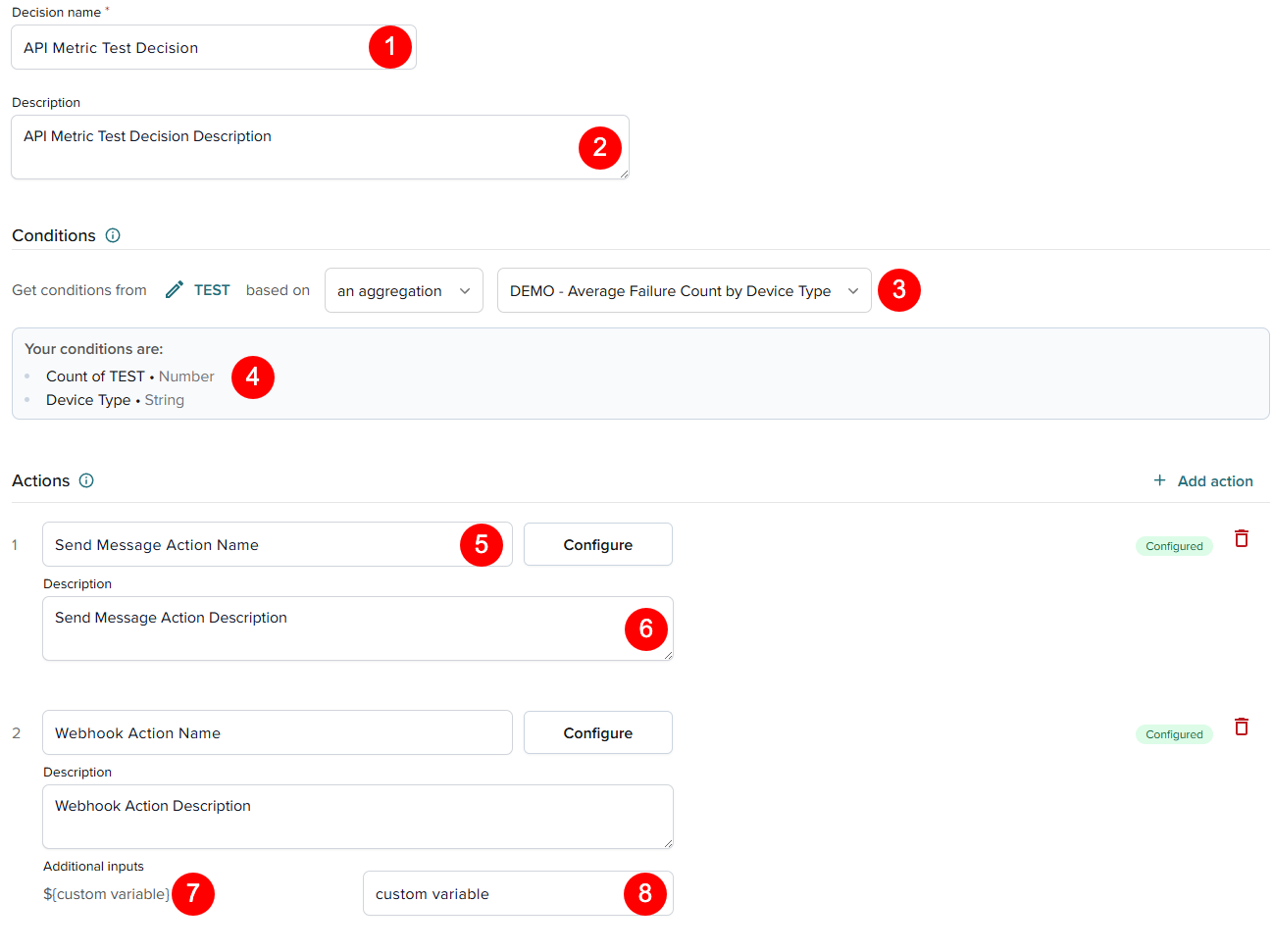
| Place in the screenshot | Field |
|---|---|
| 1 | DecisionDto.name |
| 2 | DecisionDto.description |
| 3 | DecisionDto.sourceType |
| 4 | DecisionDto.inputFields |
| 5 | ActionDto.name |
| 6 | ActionDto.description |
| 7 | DecisionOutputFieldDto.variable |
| 8 | DecisionOutputFieldDto.name |
Sample request
{
"name": "API Metric Test Decision",
"description": "API Metric Test Decision Description",
"sourceId": "73a2de07-3df6-4d9b-9ff7-28c738PNTEST",
"sourceType": "METRIC",
"enabled": false,
"hitType": "SINGLE",
"activeFrom": "2025-08-21T17:32:28.282Z",
"activeUntil": "2025-09-20T17:32:28.282Z",
"executeOnce": false,
"executionFrequency": 60,
"actions": [
{
"name": "Send Message Action Name",
"description": "Send Message Action Description",
Event-based decision example:
{
"name": "API Event Test Decision",
"description": "This is a test description for an event based decision.",
"sourceId": "80812fcb-0ab9-4707-b768-2a16eePNTEST",
"sourceType": "BUSINESSOBJECT",
"enabled": false,
"hitType": "SINGLE",
"activeFrom": "2025-08-21T17:57:57.692Z",
"activeUntil": "2025-09-20T17:57:57.692Z",
"executeOnce": false,
"executionFrequency": 60,
"inputFields": [
{
"sourceId": "3ddcedbf-f182-48b2-bf6a-3fcf58PNTEST",
"name": "Player ID",
Sample response
{
"id": "a41c8507-46ce-496f-ba0d-f7319aPNTEST",
"accountId": "123456",
"businessObjectId": "80812fcb-0ab9-4707-b768-2a16eePNTEST",
"sourceType": "METRIC",
"sourceId": "73a2de07-3df6-4d9b-9ff7-28c738PNTEST",
"name": "API Metric Test Decision",
"description": "API Metric Test Decision Description",
"hitType": "SINGLE",
"enabled": false,
"activeFrom": "2025-08-21T17:32:28.282Z",
"activeUntil": "2025-09-20T17:32:28.282Z",
"executeOnce": false,
"executionFrequency": 60,
"actions": [
Response field descriptions
| Field | Description |
|---|---|
id | Required in later requests to update, delete, or retrieve this decision. |
sourceId | If sourceType is METRIC or BUSINESSOBJECT, this is their ID; required when recreating or updating the decision. |
inputFields[].id | Required when creating or updating rules in this decision (rules reference inputFieldId). |
inputFields[].sourceId | Links to the Business Object field or metric field used as input; may be reused in other decisions. |
actions[].id | Required when referencing an action in rules (actionId in actionValues). |
rules[].id | Required for updating rules directly. |
createdAt/updatedAt | Metadata only; not required in other requests. |
Recommended workflow
Use this workflow when creating a decision with rules. Because rules reference IDs generated by the system (inputFields[].id, outputFields[].id, actions[].id), the most reliable automation pattern is a multi-call workflow:
- Create (disabled):
POST /decisionswithenabled: false. - Add fields + actions:
PUT /decisions/{id}withinputFields,outputFields, andactionswithout anyidproperties. - Read back IDs:
GET /decisions/{id}and capture generated IDs:inputFields[].idoutputFields[].idactions[].id
- Add rules:
PUT /decisions/{id}withrulesthat reference those generated IDs. - Enable:
PUT /decisions/{id}withenabled: true.
This workflow helps avoid common errors.
Action template variables
Only fields that exist for the decision at runtime can be used as variables. Built-in placeholders like ${timestamp} are not supported.
Action template strings (for example PUBNUB_PUBLISH.template.body or WEBHOOK_EXECUTION.template.payload) support ${...} placeholders, but the placeholder must reference a real field that exists for the decision (for example an input field or output field). Built-in placeholders (for example ${timestamp}) are not available and will fail validation with errors like: "Variable '${timestamp}' does not reference a valid field".
List decisions
Returns a list of all decisions for your account.
Endpoint: GET /decisions
Example: https://admin-api.pubnub.com/v2/illuminate/decisions
Sample request
curl --request GET \
  --url 'https://admin-api.pubnub.com/v2/illuminate/decisions' \
  -H "Authorization: YOUR_API_KEY_HERE" \
  -H "PubNub-Version: 2026-02-09" \
  -H "Content-Type: application/json"
Sample response
[
  {
    "id": "003d5d4f-6bb7-48f8-8b0b-bc8dd79ae792",
    "accountId": "123456",
    "name": "car brand count",
    "description": "",
    "enabled": false,
    "createdAt": "2024-09-20T20:20:17.629Z",
    "updatedAt": "2024-09-20T20:20:17.629Z"
  }
]
Response fields
The /decisions endpoint guarantees only id and name. Other fields may change without notice.
Get decision
Returns details for a specific decision.
Endpoint: GET /decisions/{id}
Example: https://admin-api.pubnub.com/v2/illuminate/decisions/{id}
Path parameters
| Parameter | Description |
|---|---|
idType: string | Decision ID. |
Sample request
curl --request GET \
  --url 'https://admin-api.pubnub.com/v2/illuminate/decisions/a41c8507-46ce-496f-ba0d-f7319aPNTEST' \
  -H "Authorization: YOUR_API_KEY_HERE" \
  -H "PubNub-Version: 2026-02-09" \
  -H "Content-Type: application/json"
Sample response
Returns the complete decision details as shown in the Create decision sample response.
Update decision
Updates an existing decision.
Endpoint: PUT /decisions/{id}
Example: https://admin-api.pubnub.com/v2/illuminate/decisions/{id}
Inactive decisions for structural updates
When a decision is enabled, its structure is immutable:
- You cannot change
inputFields,outputFields, oractions. - If you need to add/remove/reorder fields or actions, disable the decision first (
enabled: false), apply your updates, then re-enable.
If you see errors like "inputFields cannot be changed on an active decision", disable the decision and retry.
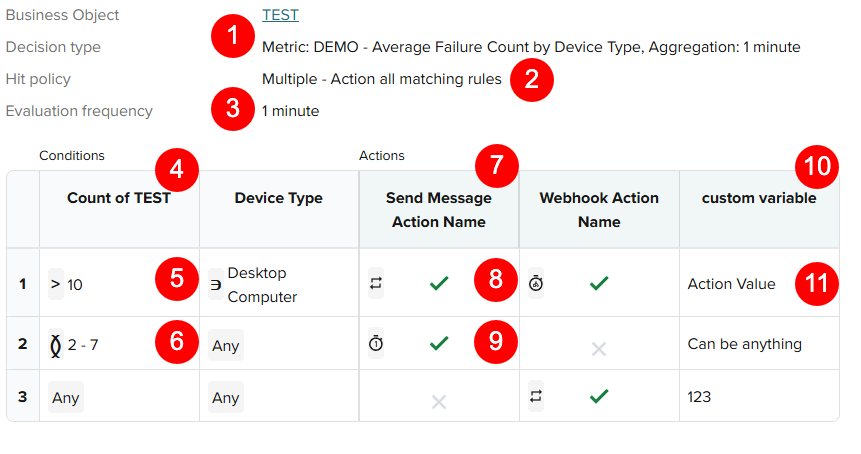
| Place in the screenshot | Field/DTO |
|---|---|
| 1 | DecisionDto.sourceType |
| 2 | DecisionDto.hitType |
| 3 | DecisionDto.executionFrequency |
| 4 | DecisionInputFieldDto.name |
| 5 | DecisionInputFieldDto.argument |
| 6 | DecisionInputFieldDto.operation |
| 7 | ActionDto.name |
| 8 | ActionValueDto.status |
| 9 | ActionValueDto.executionLimitType |
| 10 | DecisionOutputFieldDto.name |
| 11 | DecisionOutputValueDto.value |
Path parameters
| Parameter | Description |
|---|---|
idType: string | Decision ID. |
Request body
Same as Create decision request body, with additional rules configuration.
Sample request
{
// === Decision Metadata ===
"id": "a41c8507-46ce-496f-ba0d-f7319aPNTEST",
"name": "API Metric Test Decision",
"description": "API Metric Test Decision Description",
"sourceId": "73a2de07-3df6-4d9b-9ff7-28c738PNTEST",
"sourceType": "METRIC",
"enabled": false,
"hitType": "MULTI",
"activeFrom": "2025-08-21T17:32:28.282Z",
"activeUntil": "2025-09-20T17:32:28.282Z",
"executeOnce": false,
"executionFrequency": 60,
// === Input Fields ===
Sample response
{
// === Decision Metadata ===
"id": "a41c8507-46ce-496f-ba0d-f7319aPNTEST",
"accountId": "123456",
"businessObjectId": "80812fcb-0ab9-4707-b768-2a16eePNTEST",
"sourceType": "METRIC",
"sourceId": "73a2de07-3df6-4d9b-9ff7-28c738PNTEST",
"name": "API Metric Test Decision",
"description": "API Metric Test Decision Description",
"hitType": "MULTI",
"enabled": false,
"activeFrom": "2025-08-21T17:32:28.282Z",
"activeUntil": "2025-09-20T17:32:28.282Z",
"executeOnce": false,
"executionFrequency": 60,
Delete decision
Deletes a decision and removes its rules and actions permanently.
Endpoint: DELETE /decisions/{id}
Example: https://admin-api.pubnub.com/v2/illuminate/decisions/{id}
Permanent deletion
Deleting a decision permanently removes its rules and actions.
Path parameters
| Parameter | Description |
|---|---|
idType: string | Decision ID. |
Sample request
curl --request DELETE \
  --url 'https://admin-api.pubnub.com/v2/illuminate/decisions/a41c8507-46ce-496f-ba0d-f7319aPNTEST' \
  -H "Authorization: YOUR_API_KEY_HERE" \
  -H "PubNub-Version: 2026-02-09" \
  -H "Content-Type: application/json"
Reset action limits
Resets action execution limits for debugging purposes.
Endpoint: POST /decisions/{id}/action-limit-reset
Example: https://admin-api.pubnub.com/v2/illuminate/decisions/{id}/action-limit-reset
Path parameters
| Parameter | Description |
|---|---|
idType: string | Decision ID. |
Sample Request
{
  "ruleActions": [
    {
      "ruleId": "86106f51-4461-4cd5-8a9e-930babPNTEST",
      "actionId": "5f6afd68-1d3c-45a1-8a1a-3291faPNTEST"
    }
  ]
}
Retrieve action log
Retrieves historical action execution logs for a given decision.
Defaults and limits
- Default results: 50 records if no date range is specified
- Max results with date range: 10,000 records
- Time zone: UTC; ISO 8601 timestamps without milliseconds
- Default sort:
timestamp:desc
Results can be returned in JSON or CSV format and filtered by various parameters.
Endpoint: GET /decisions/{id}/action-log
Example: https://admin-api.pubnub.com/v2/illuminate/decisions/{id}/action-log
Path parameters
| Parameter | Description |
|---|---|
decisionIdType: string | Decision ID. |
Query parameters
| Parameter | Description |
|---|---|
sort | The order in which to sort the data in the response. If sort order is not specified, the default sort order is timestamp descending (timestamp:desc) |
success | Request to return log entries with specified success status. Must either be true or false. If you only need success or failures, then success=true or success=false. If success is not specified, all statuses are returned |
startDate | Date range in UTC. Must be in ISO 8601 format and without milliseconds precision, e.g., 2024-12-02T14:06:25. If no date is provided, the most recent 50 records are returned |
endDate | Data range in UTC. Must be after startDate |
search | Additional search term by which to filter the results. Only action log entries containing this search term are returned in the results |
format | Either JSON or CSV data format. If this parameter is not specified, the data will be returned in JSON |
Query Parameter Validation
All query string parameters are optional and, if specified, are validated and handled as follows:
-
For the
searchparameter: The value must not be longer than 256 characters. Case-insensitive search is performed to only return log entries where ANY of the following fields contain the specified search term: actionName, errorMessage, triggeringConditions, and outputValues. -
The
sortparameter is specified in the syntax<column>[:<direction>], e.g., sort=actionName:desc.- Direction is optional and, if specified, must be either "asc" or "desc", defaulting to "asc"; e.g., sort=actionName is equivalent to sort=actionName:asc
- Columns that can be sorted include: actionName, actionType, errorMessage, success, timestamp.
- The secondary sort is automatically applied on timestamp descending if the main sort is not on timestamp.
- For example, sort=actionName applies a primary sort on actionName ascending and a secondary sort on timestamp descending. That way any log entries that have the same value for the primary sort column are listed with the most recent ones first.
- If sort is not specified, the default sort order is timestamp descending (timestamp:desc), which returns the results with the most recent actions listed first.
Note: This endpoint returns HTTP 200 (Success) even if no records match the specified date range and/or filters.
- The
startDateandendDateparameters have additional validation:- Date values without a time component are allowed. For example, startDate=2024-12-02,endDate=2024-12-04 means return all records between those two dates, inclusive.
- The time zone is UTC, and this may optionally be indicated explicitly by including "Z" at the end of the time value; e.g., 2024-12-02T14:06:25Z.
- If endDate is specified, startDate must also be specified. In contrast, if only startDate is specified, all actions after that start date/time are returned without having to explicitly specify an endDate.
- endDate must not be before startDate.
- Depending on your volume, the recommended date range is less than an hour. Date range must not exceed 30 days. Note that if only startDate is specified then endDate is treated as the current date/time when performing this 30 days range check.
- If a date range is not specified, only 50 records are returned. Those 50 records still satisfy any optional filtering/sorting options.
- If a date range is specified, at most 10,000 records are returned in a single API call.
- If more than that many action log records are found for the specified date range (and any additional filter criteria, if specified), then a 422 (Unprocessable Entity) error status code is returned with the following message: "Response contains more records than the maximum allowed of 10000. Please narrow the date range or apply additional filters."
Sample Request
curl --request GET \
  --url 'https://admin-api.pubnub.com/v2/illuminate/decisions/5a99115a-0aee-463e-b672-5abdc7c9c2fc/action-log?startDate=2024-11-26T22%3A20%3A43Z&endDate=2024-11-27%3A23%3A59Z&format=json&sort=timestamp%3Adesc&search=John' \
  -H "Authorization: YOUR_API_KEY_HERE" \
  -H "PubNub-Version: 2026-02-09" \
  -H "Content-Type: application/json"
Sample Response
[
{
"decisionId": "5a99115a-0aee-463e-b672-5abdc7c9c2fc",
"ruleId": "ab4284e4-d9de-4c16-b265-d736d36a425a",
"actionId": "a6318683-b304-4393-985d-6bf152fae4c4",
"businessObjectId": "461644e6-3182-447c-af5a-1f2bbdc189d4",
"actionName": "award bonus kudos",
"actionType": "APPCONTEXT_SET_USER_METADATA",
"triggeringConditions": [
{
"inputFieldId": "ff32b716-e7bb-4b10-b093-d0963ca7de09",
"name": "uuid",
"inputValue": "student-01",
"operation": "ANY",
"thresholdValue": ""
CSV sample response
decisionId,ruleId,actionId,businessObjectId,actionName,actionType,triggeringConditions,outputValues,success,timestamp,errorMessage
5a99115a-0aee-463e-b672-5abdc7c9c2fc,ab4284e4-d9de-4c16-b265-d736d36a425a,a6318683-b304-4393-985d-6bf152fae4c4,461644e6-3182-447c-af5a-1f2bbdc189d4,award bonus kudos,APPCONTEXT_SET_USER_METADATA,"[{""inputFieldId"":""ff32b716-e7bb-4b10-b093-d0963ca7de09"",""name"":""uuid"",""inputValue"":""student-01"",""operation"":""ANY"",""thresholdValue"":""""}]","[{""outputFieldId"":""bd6163b3-3898-4a42-89e0-31fbc1b5ce7d"",""name"":""grade"",""value"":""A+""}]",true,2024-11-27T17:08:02.000Z,
Response field descriptions
The data returned with every Action History API response includes the following:
| Field | Description |
|---|---|
decisionId | Unique ID PubNub assigns to each Illuminate Decision |
ruleId | Unique ID PubNub assigns to each Illuminate Decision rule |
actionId | Unique ID PubNub assigns to each Illuminate Decision action |
businessObjectId | Unique ID PubNub assigns to each Illuminate Business Object |
actionName | Name you assigned to the action |
actionType | Type of action executed: WEBHOOK_EXECUTION, PUBNUB_PUBLISH, APPCONTEXT_SET_USER_METADATA, APPCONTEXT_SET_CHANNEL_METADATA, APPCONTEXT_SET_MEMBERSHIP_METADATA |
triggeringConditions | List of conditions and values that triggered the action: inputFieldId - unique ID PubNub assigns to each condition, name - name you assigned to the condition, inputValue - actual value during runtime, operation - used together with the threshold value, thresholdValue |
outputValues | Parameters tied to the selected action type |
success | Success status. Indicates whether or not the action fired successfully. If the action was successful, "success": "true". If the action failed, "success": "false" |
timestamp | Date and time when the action fired, e.g., 2024-11-28T15:40:13.000 |
errorMessage | Reason for when an action failed to execute. Empty string if no error |
Dashboards
Dashboards visualize your metrics and optionally overlay decision triggers. Each chart displays one metric grouped by dimensions.
| Operation | HTTP Method | Endpoint |
|---|---|---|
| Create a dashboard | POST | /dashboards |
| List all dashboards | GET | /dashboards |
| Get a specific dashboard | GET | /dashboards/{id} |
| Update a dashboard | PUT | /dashboards/{id} |
| Delete a dashboard | DELETE | /dashboards/{id} |
Create dashboard
Creates a new dashboard to visualize metrics with optional decision overlays.
Endpoint: POST /dashboards
Example: https://admin-api.pubnub.com/v2/illuminate/dashboards
Request body
| Field | Type | Required | Description |
|---|---|---|---|
name | string | Yes | Dashboard title (max 50 characters). |
charts | ChartDto[] | No | List of charts to display. |
dateRange | enum | Yes | 30 minutes, 1 hour, 24 hours, 3 days, 1 week, 30 days, 3 months, Custom date. |
startDate | datetime | Conditional | Required when dateRange is Custom date. |
endDate | datetime | Conditional | Required when dateRange is Custom date. |
customerIds | string[] | No | Customer IDs (requires Partner Portal). |
ChartDto
| Field | Type | Required | Description |
|---|---|---|---|
id | string | Conditional | Chart ID (required for updates). |
metricId | string | Yes | ID of the metric to display. |
viewType | enum | Yes | BAR, LINE, or STACKED. |
size | enum | Yes | FULL or HALF. |
showDecisions | boolean | No | Whether to display decision overlays. |
dimensionIds | string[] | No | Default selected dimensions. |
decisionIds | string[] | No | Decision IDs to overlay. |
Sample Request
{
"name": "Test Dashboard for API",
"charts": [
{
"name": "DEMO - Average Failure Count by Device Type",
"metric": {
"id": "21583568-cb7b-4413-8166-f56d0cPNTEST"
},
"viewDateRange": "24 hours",
"viewType": "STACKED",
"size": "HALF",
"dimensionIds": [
"5c4e98b4-f6d7-497a-956b-7605c7PNTEST"
],
"decisionIds": [
Sample Response
{
"id": "cb51d7c1-223b-4025-9ffa-0b5be4PNTEST",
"name": "Test Dashboard for API",
"accountId": "123456",
"dateRange": "1 hour",
"startDate": "2025-08-21T20:15:48.059Z",
"endDate": "2025-08-21T21:15:48.059Z",
"charts": [
{
"accountId": "622497",
"id": "a989023f-4add-4498-91f0-98d1c5PNTEST",
"name": "DEMO - Average Failure Count by Device Type",
"viewType": "STACKED",
"metricId": "21583568-cb7b-4413-8166-f56d0cPNTEST",
"size": "HALF",
Response field descriptions
| Field | Description |
|---|---|
id | Required in later requests to update, delete, or retrieve the dashboard. |
charts[].id | Optional; only required if updating that chart directly within the dashboard. |
charts[].metricId | Links to the metric displayed in the chart; required if you want to recreate or update this chart with the same metric. |
charts[].dimensionIds | Field IDs used for grouping in the chart; may be reused in other metrics or dashboards. |
charts[].showDecisions | Whether decision overlays are displayed on the chart. |
charts[].metric | Optional nested object with details of the metric referenced by metricId. |
charts[].accountId | Account ID associated with the chart. |
decisionIds | If decisions are overlaid on the chart, these IDs must match decisions in the system. |
accountId | Required for all API paths for your account. |
createdAt/updatedAt | Metadata only; not required in other requests. |
List dashboards
Returns a list of all dashboards for your account.
See also: Build your first dashboard → Create dashboard.
Endpoint: GET /dashboards
Example: https://admin-api.pubnub.com/v2/illuminate/dashboards
Sample Request
curl --request GET \
  --url 'https://admin-api.pubnub.com/v2/illuminate/dashboards' \
  -H "Authorization: YOUR_API_KEY_HERE" \
  -H "PubNub-Version: 2026-02-09" \
  -H "Content-Type: application/json"
Sample Response
Returns an array of dashboard objects as shown in the Create Dashboard sample response.
Get dashboard
Returns details for a specific dashboard.
Endpoint: GET /dashboards/{id}
Example: https://admin-api.pubnub.com/v2/illuminate/dashboards/{id}
Path parameters
| Parameter | Description |
|---|---|
idType: string | Dashboard ID. |
Sample Request
curl --request GET \
  --url 'https://admin-api.pubnub.com/v2/illuminate/dashboards/cb51d7c1-223b-4025-9ffa-0b5be4PNTEST' \
  -H "Authorization: YOUR_API_KEY_HERE" \
  -H "PubNub-Version: 2026-02-09" \
  -H "Content-Type: application/json"
Sample Response
Returns the complete dashboard details as shown in the Create Dashboard sample response.
Update dashboard
Updates an existing dashboard configuration, time ranges, or decision overlays.
Endpoint: PUT /dashboards/{id}
Example: https://admin-api.pubnub.com/v2/illuminate/dashboards/{id}
Path parameters
| Parameter | Description |
|---|---|
idType: string | Dashboard ID. |
Request body
Same as Create Dashboard request body.
Sample Request
{
  "name": "Updated Dashboard Name",
  "dateRange": "24 hours"
}
Delete dashboard
Deletes a dashboard.
Endpoint: DELETE /dashboards/{id}
Example: https://admin-api.pubnub.com/v2/illuminate/dashboards/{id}
Visualization only
Deleting a dashboard removes only the visualization. Metrics and decisions remain.
Path parameters
| Parameter | Description |
|---|---|
idType: string | Dashboard ID. |
Sample Request
curl --request DELETE \
  --url 'https://admin-api.pubnub.com/v2/illuminate/dashboards/cb51d7c1-223b-4025-9ffa-0b5be4PNTEST' \
  -H "Authorization: YOUR_API_KEY_HERE" \
  -H "PubNub-Version: 2026-02-09" \
  -H "Content-Type: application/json"
Queries
Queries define how data captured is selected, filtered, transformed, and returned. They provide a flexible way to shape data beyond fixed metric aggregations. Use queries to execute ad-hoc previews, or use query output as the data source for decisions.
| Operation | HTTP Method | Endpoint |
|---|---|---|
| Execute ad-hoc query | POST | /queries/execute |
| Create query | POST | /queries |
| List queries | GET | /queries |
| Get query | GET | /queries/{id} |
| Update query | PUT | /queries/{id} |
| Delete query | DELETE | /queries/{id} |
| Execute saved query | POST | /queries/{id}/execute |
| Get query fields | GET | /queries/{id}/fields |
| Create predefined decision from query | POST | /queries/{id}/predefined-decisions |
Query DTO Reference
The following DTOs define the request and response shapes used by the Queries API.
QueryRequestDto
Top-level query definition used for ad-hoc execution and when creating or updating saved queries.
| Field | Type | Required | Description |
|---|---|---|---|
version | string | Yes | Version identifier for the query definition format (e.g. "1", "2.0"). |
pipeline | PipelineDto | Yes | Query pipeline definition. |
meta | object | No | Optional metadata (preview flags, template info, etc.). |
PipelineDto
Defines the full data flow for a query: sources → transforms → output.
| Field | Type | Required | Description |
|---|---|---|---|
sources | SourceDto[] | Yes | One data source. |
transforms | TransformDto[] | No | Optional transformation steps. |
output | OutputDto | Yes | Output configuration (which stage to return and what fields). |
Pipeline requirements
At least one source is required. Each transform input must reference an existing source or transform id.
SourceDto
Defines a data source for the query pipeline.
| Field | Type | Required | Description |
|---|---|---|---|
id | string | Yes | Identifier for this source within the pipeline (used by transforms and output). |
type | enum | Yes | businessObject |
businessObjectId | string | Conditional | Required when type is businessObject. |
timeRange | TimeRangeDto | No | Time filter applied to the source. |
filters | FilterDto[] | No | Source-level filters applied before transforms. |
fields | FieldDto[] | Yes | Fields selected from the source. |
Conditional requirements
Exactly one of businessObjectId or referenceId must be provided according to type.
TimeRangeDto
Defines the time window applied to a source.
| Field | Type | Required | Description |
|---|---|---|---|
field | string | Yes | Timestamp field used for filtering (e.g. eventTimestamp). |
relative | RelativeTimeDto | No | Relative time window (preferred for sliding windows). |
absolute | AbsoluteTimeDto | No | Absolute time window (ISO 8601 start/end). |
Time range type
Only one of relative or absolute may be specified.
RelativeTimeDto
Defines a time window relative to now.
| Field | Type | Required | Description |
|---|---|---|---|
direction | enum | Yes | past or future. |
value | number | Yes | Quantity of the time unit. |
unit | enum | Yes | seconds, minutes, hours, days, weeks, months. |
AbsoluteTimeDto
Defines an explicit start and end time window.
| Field | Type | Required | Description |
|---|---|---|---|
start | string | Yes | ISO 8601 start timestamp. |
end | string | Yes | ISO 8601 end timestamp. |
FieldDto
Defines a field selected from a source or referenced by transforms.
| Field | Type | Required | Description |
|---|---|---|---|
id | string | No | Field ID when referencing an existing Business Object field (v2.0). |
name | string | Conditional | Inline field name when not referencing an id. |
alias | string | No | Alias used within the pipeline; used by groupBy, select, etc. |
type | enum | Conditional | dimension or measure (v2.0 semantics). |
source | enum | Conditional | JSONPATH or DERIVED. |
jsonPath | string | Conditional | JSONPath expression when source is JSONPATH. |
jsonFieldType | enum | Conditional | TEXT, NUMERIC, or TIMESTAMP. |
derivation | object | Conditional | Derivation specification when source is DERIVED. |
Conditional requirements
Either id (v2.0 style) or the inline pair name + source (v1 style) must be provided depending on version. Aliases are recommended for transforms and output.
TransformDto
Defines a transformation step applied to a source or to the output of another transform.
| Field | Type | Required | Description |
|---|---|---|---|
id | string | Yes | Identifier for the transform step (referenced by later stages). |
type | enum | Yes | aggregate or unnest. |
input | string | Yes | ID of the source or previous transform. |
aggregate | AggregateTransformDto | Conditional | Present when type is aggregate. |
unnest | UnnestTransformDto | Conditional | Present when type is unnest. |
filters | FilterDto[] | No | Filters applied after the transform step. |
UnnestTransformDto
Defines unnest behavior when transform type is unnest (expands an array field into rows).
| Field | Type | Required | Description |
|---|---|---|---|
arrayField | string | Yes | Name or alias of the array field to unnest. |
alias | string | No | Alias for the unnested value in the output. |
AggregateTransformDto
Defines grouping and aggregation behavior for aggregate transforms.
| Field | Type | Required | Description |
|---|---|---|---|
groupBy | string[] | Yes | Fields (aliases) to group by. |
aggregations | AggregationDto[] | Yes | Aggregations to produce aggregated output. |
collectFields | CollectFieldDto[] | No | Optional collection/array aggregations (e.g., groupUniqArray). |
AggregationDto
Defines a single aggregation.
| Field | Type | Required | Description |
|---|---|---|---|
function | enum | Yes | count, sum, avg, min, max, countDistinct. |
field | string | Yes | Field to aggregate (alias or field name). Use * for count when no specific field is needed. |
alias | string | Yes | Output field name for the aggregation. |
parameter | number | No | Optional parameter for advanced aggregations (e.g. percentile). |
FilterDto
Defines a filter condition applied to a source or transform.
| Field | Type | Required | Description |
|---|---|---|---|
field | string | Yes | Field to filter on (alias or name). |
operator | string | Yes | Filter operator: =, !=, >, <, >=, <=, isEmpty, isNotEmpty, between, notBetween, contains, notContains, startsWith, endsWith, minLength, maxLength. |
value | object | No | Comparison value (type is operator-dependent). |
OutputDto
Defines the final output stage of the pipeline.
| Field | Type | Required | Description |
|---|---|---|---|
from | string | Yes | ID of the source or transform to output from. |
select | OutputSelectDto[] | Yes | Fields to include in the output. |
orderBy | OrderByDto[] | No | Output sorting configuration. |
limit | number | No | Maximum number of results (1–500). |
offset | number | No | Pagination offset (>= 0). |
OutputSelectDto
Defines a single selected output field.
| Field | Type | Required | Description |
|---|---|---|---|
field | string | Yes | Field name or alias to return. |
alias | string | No | Optional output alias. |
id | string | No | Optional selection identifier (v2.0). |
OrderByDto
Defines sorting for output or collected fields.
| Field | Type | Required | Description |
|---|---|---|---|
field | string | Yes | Field to sort by. |
direction | enum | Yes | ASC or DESC. |
Execute ad-hoc query
Executes a query definition without saving it. Use this to preview results before creating a saved query.
Endpoint: POST /queries/execute
Example: https://admin-api.pubnub.com/v2/illuminate/queries/execute
Request body
The request body should contain a QueryRequestDto with version, pipeline, and optional meta.
Sample request
{
"version": "2.0",
"pipeline": {
"sources": [
{
"id": "testing_via_postman_source",
"type": "businessObject",
"businessObjectId": "a2ce4ba0-44a7-449e-92d3-b4558a6cpntest",
"fields": [
{ "id": "54c1fa3d-af1d-4e50-9c64-ebc6f9pntest", "alias": "user", "type": "dimension" },
{ "id": "4c5aed68-c01e-4617-96a3-65eb36pntest", "alias": "message", "type": "dimension" },
{ "id": "f7b54183-f8f5-4cc0-a6e3-df6fddpntest", "alias": "channel", "type": "dimension" }
],
"timeRange": {
"field": "timestamp",
IDs in the sample are partially redacted (suffix pntest). Use your own business object ID and field IDs from Get business object.
Sample response
{
  "data": [
    {
      "userId": "user-123",
      "eventCount": 12,
      "eventTypes": ["message_received", "message_sent"]
    }
  ],
  "executionTime": 42,
  "queryDefinition": {}
}
Response field descriptions
| Field | Description |
|---|---|
data | Array of result rows; each row is an object keyed by output field names or aliases. |
executionTime | Query execution time in milliseconds. |
queryDefinition | The QueryRequestDto that was executed (echoed back). |
Create query
Creates and saves a query definition for reuse in dashboards and decisions.
Endpoint: POST /queries
Example: https://admin-api.pubnub.com/v2/illuminate/queries
Request body
The request body should contain a query resource with name, optional description, and definition (a QueryRequestDto). The saved object is returned as a QueryDto with an assigned id.
| Field | Type | Required | Description |
|---|---|---|---|
name | string | Yes | Query name (max 255 characters). |
description | string | No | Description (max 1000 characters). |
definition | QueryRequestDto | Yes | Full query definition (version, pipeline, meta). |
customerId | string | null | No | Optional customer scope (nullable). |
Sample request
{
"name": "test",
"accountId": "current-account",
"definition": {
"version": "2.0",
"pipeline": {
"sources": [
{
"id": "testing_via_postman_source",
"type": "businessObject",
"businessObjectId": "a2ce4ba0-44a7-449e-92d3-b4558a6cpntest",
"fields": [
{ "id": "54c1fa3d-af1d-4e50-9c64-ebc6f9pntest", "alias": "user", "type": "dimension" },
{ "id": "4c5aed68-c01e-4617-96a3-65eb36pntest", "alias": "message", "type": "dimension" },
{ "id": "f7b54183-f8f5-4cc0-a6e3-df6fddpntest", "alias": "channel", "type": "dimension" }
Sample response
{
"id": "870361e4-e763-4b91-8d78-f52f46pntest",
"accountId": "123456",
"name": "test",
"definition": {
"version": "2.0",
"pipeline": {
"sources": [
{
"id": "testing_via_postman_source",
"type": "businessObject",
"businessObjectId": "a2ce4ba0-44a7-449e-92d3-b4558a6cpntest",
"fields": [
{ "id": "54c1fa3d-af1d-4e50-9c64-ebc6f9pntest", "alias": "user", "type": "dimension" },
{ "id": "4c5aed68-c01e-4617-96a3-65eb36pntest", "alias": "message", "type": "dimension" },
Response field descriptions
| Field | Description |
|---|---|
id | PubNub-generated unique ID for the query. Required in later requests for GET, UPDATE, DELETE, execute, get fields, and predefined-decisions. |
accountId | Your account identifier. |
name | Query name as provided on create. |
definition | The saved QueryRequestDto. |
createdAt / updatedAt / createdBy / updatedBy | Metadata only; not required in other requests. You can use these for audit. |
template | Optional template identifier when the query was created from a template (present in some responses). |
List queries
Returns a list of all saved queries for your account. No request body; use GET with optional query parameters only.
Endpoint: GET /queries
Example: https://admin-api.pubnub.com/v2/illuminate/queries
Query parameters
| Name | Type | Required | Description |
|---|---|---|---|
customerId | string | No | Filter queries by customer scope. |
isCustomer | boolean | No | Filter queries that are customer-scoped. |
Sample request
curl --request GET \
  --url 'https://admin-api.pubnub.com/v2/illuminate/queries' \
  -H "Authorization: YOUR_API_KEY_HERE" \
  -H "PubNub-Version: 2025-11-15" \
  -H "Content-Type: application/json"
Sample response
[
{
"id": "0d733da5-ccd3-4305-bb7e-32247f8pntest",
"accountId": "123456",
"name": "Top N Testing",
"createdAt": "2026-01-16T08:16:21.359Z",
"updatedAt": "2026-01-16T08:16:21.359Z",
"createdBy": "user@yourcompany.com",
"updatedBy": "user@yourcompany.com",
"template": "topn"
},
{
"id": "3969d206-e106-446d-bd72-d971c1cpntest",
"accountId": "123456",
"name": "Cross Posting Testing",
IDs in the sample are partially redacted (suffix pntest). The list does not include definition or description; use Get query for full details including the query definition.
Response fields
Each item includes id, accountId, name, createdAt, updatedAt, createdBy, updatedBy, and template. createdBy and updatedBy may be null.
Get query
Returns details for a specific saved query, including the full definition.
Endpoint: GET /queries/{id}
Example: https://admin-api.pubnub.com/v2/illuminate/queries/{id}
Path parameters
| Parameter | Description |
|---|---|
idType: string | Query ID. |
Sample request
curl --request GET \
  --url 'https://admin-api.pubnub.com/v2/illuminate/queries/870361e4-e763-4b91-8d78-f52f46pntest' \
  -H "Authorization: YOUR_API_KEY_HERE" \
  -H "PubNub-Version: 2025-11-15" \
  -H "Content-Type: application/json"
Sample response
Returns the complete query details as shown in the Create query sample response.
Update query
Updates an existing saved query definition.
Endpoint: PUT /queries/{id}
Example: https://admin-api.pubnub.com/v2/illuminate/queries/{id}
Path parameters
| Parameter | Description |
|---|---|
idType: string | Query ID. |
Request body
Same as Create query request body.
Sample response
Returns the complete query details as shown in the Create query sample response.
Delete query
Deletes a saved query.
Endpoint: DELETE /queries/{id}
Example: https://admin-api.pubnub.com/v2/illuminate/queries/{id}
Path parameters
| Parameter | Description |
|---|---|
idType: string | Query ID. |
Sample request
curl --request DELETE \
  --url 'https://admin-api.pubnub.com/v2/illuminate/queries/870361e4-e763-4b91-8d78-f52f46pntest' \
  -H "Authorization: YOUR_API_KEY_HERE" \
  -H "PubNub-Version: 2025-11-15" \
  -H "Content-Type: application/json"
Execute saved query
Executes a saved query by ID and returns results. Use this after saving a query with Create query.
Endpoint: POST /queries/{id}/execute
Example: https://admin-api.pubnub.com/v2/illuminate/queries/{id}/execute
Path parameters
| Parameter | Description |
|---|---|
idType: string | Query ID. |
Sample request
curl --request POST \
  --url 'https://admin-api.pubnub.com/v2/illuminate/queries/870361e4-e763-4b91-8d78-f52f46pntest/execute' \
  -H "Authorization: YOUR_API_KEY_HERE" \
  -H "PubNub-Version: 2025-11-15" \
  -H "Content-Type: application/json"
Sample response
Response shape matches Execute ad-hoc query: data (result rows), executionTime (milliseconds), and queryDefinition (the saved definition that was executed).
Get query fields
Returns the list of fields available for selection when creating dashboards or decisions from this query. Use these field identifiers when configuring charts or decision input sources.
Endpoint: GET /queries/{id}/fields
Example: https://admin-api.pubnub.com/v2/illuminate/queries/{id}/fields
Path parameters
| Parameter | Description |
|---|---|
idType: string | Query ID. |
Sample request
curl --request GET \
  --url 'https://admin-api.pubnub.com/v2/illuminate/queries/383830b4-b514-4a94-857e-41e05fb82ceb/fields' \
  -H "Authorization: YOUR_API_KEY_HERE" \
  -H "PubNub-Version: 2025-11-15" \
  -H "Content-Type: application/json"
Sample response
[
  { "field": "userId", "alias": "userId", "id": "sel_userId" },
  { "field": "eventType", "alias": "eventType", "id": "sel_eventType" }
]
Each item includes the output field name or alias and an optional selection identifier (id) for use in dashboard or decision configuration.
Create predefined decision from query
Creates a predefined decision using the query output as its data source. The resulting decision behaves identically to decisions created via the Decisions API and can be updated or managed with the same endpoints.
Endpoint: POST /queries/{id}/predefined-decisions
Example: https://admin-api.pubnub.com/v2/illuminate/queries/{id}/predefined-decisions
Path parameters
| Parameter | Description |
|---|---|
idType: string | Query ID. |
Request body
None. Send a POST request with no body (or an optional empty JSON object). Use the query ID in the path and include the required headers (Authorization, PubNub-Version, Content-Type: application/json).
Sample request
curl --request POST \
  --url 'https://admin-api.pubnub.com/v2/illuminate/queries/{id}/predefined-decisions' \
  -H "Authorization: YOUR_API_KEY_HERE" \
  -H "PubNub-Version: 2025-11-15" \
  -H "Content-Type: application/json"
Sample response
The API returns the full decision object (same shape as Create decision): predefined rules, actions, input fields (with sourceType: QUERYFIELD and sourceId referencing query output field IDs), output fields, and metadata. IDs in the sample are partially redacted (suffix pntest).
{
"id": "ae5af039-3aa5-49a7-a8a8-d52661cfpntest",
"accountId": "123456",
"sourceType": "QUERY",
"sourceId": "870361e4-e763-4b91-8d78-f52f46pntest",
"name": "Decision for test",
"description": "Trigger an action that mitigates cross-posting spam",
"hitType": "SINGLE",
"enabled": false,
"activeFrom": "2026-02-02T20:28:39.054Z",
"activeUntil": "2026-03-04T20:28:39.054Z",
"executeOnce": false,
"executionFrequency": 300,
"actions": [
{
The full response includes multiple rules (each with inputValues, outputValues, actionValues). inputFields[].sourceType is QUERYFIELD and sourceId is the query output field ID from the query definition. Use the returned id with the Decisions API to update, delete, or manage the decision.
Response field descriptions
| Field | Description |
|---|---|
id | PubNub-generated unique ID for the decision. Required when updating, deleting, or retrieving the decision via the Decisions API. |
sourceType | QUERY for decisions created from a query. |
sourceId | ID of the query that is the data source for this decision. |
inputFields | Query output fields used as decision inputs; each has sourceType: QUERYFIELD and sourceId equal to the query output field ID. |
outputFields | Custom variables for actions (e.g. Mute, Ban). |
actions | Predefined actions (e.g. webhook, App Context membership). |
rules | Predefined rules with conditions, output values, and action execution settings. |
enabled | Whether the decision is active (typically false on create). |
executionFrequency | Evaluation frequency in seconds. |
createdAt / updatedAt / createdBy / updatedBy | Metadata; not required in other requests. |
Response Definitions
Common Response Fields
All API responses include standard metadata fields:
| Field | Type | Description |
|---|---|---|
id | string | PubNub-generated unique identifier. |
accountId | string | Your PubNub account ID. |
createdAt | datetime | Creation timestamp (ISO 8601). |
updatedAt | datetime | Last update timestamp (ISO 8601). |
createdBy | string | Email of the creator. |
updatedBy | string | Email of the last updater. |
Action Types
The following action types are supported for decisions:
| Action Type | Description |
|---|---|
PUBNUB_PUBLISH | Publish a message to a PubNub channel. |
WEBHOOK_EXECUTION | Make an HTTP request to an external endpoint. |
APPCONTEXT_SET_USER_METADATA | Update PubNub App Context user metadata. |
APPCONTEXT_SET_CHANNEL_METADATA | Update PubNub App Context channel metadata. |
APPCONTEXT_SET_MEMBERSHIP_METADATA | Update PubNub App Context membership metadata. |
Evaluation Windows
Metrics support the following evaluation windows (in seconds):
| Window | Duration |
|---|---|
| 60 | 1 minute |
| 300 | 5 minutes |
| 600 | 10 minutes |
| 900 | 15 minutes |
| 1800 | 30 minutes |
| 3600 | 1 hour |
| 86400 | 1 day |
Error Codes
The Illuminate API returns standard HTTP status codes:
| Code | Description |
|---|---|
| 200 | Success |
| 201 | Created (successful resource creation) |
| 400 | Bad Request (invalid parameters) |
| 401 | Unauthorized (authentication required) |
| 403 | Forbidden (access denied) |
| 404 | Not Found (resource doesn't exist) |
| 422 | Unprocessable Entity (too many records found) |
| 500 | Internal Server Error |
Sample Error Response
{
  "errors": [
    {
      "queryString": "format",
      "message": "Invalid value for 'format' query string parameter. Value must be 'csv' or 'json'."
    },
    {
      "queryString": "startDate",
      "message": "Invalid value for 'startDate' query string parameter. Value must be a valid date in ISO 8601 format and without milliseconds precision."
    }
  ]
}