Message Persistence
Message Persistence reliably stores messages as they are published. You can easily retrieve messages that arrive while a device is offline. Set retention for specific periods or unlimited time.
Network interruptions
PubNub automatically reconnects after interruptions for a smooth experience. See the Connection Management guide for retry and backoff details.
When a message is published, PubNub stores it with the channel name and the message’s publish timetoken. You can use this data to retrieve, delete, or annotate messages.
You can retrieve the following:
Message storage options
You can publish and subscribe in real-time without storing any messages in PubNub, but there are significant benefits to using Message Persistence. Choose the approach that fits your architecture:
| Approach | When to use it |
|---|---|
| Store in PubNub | You want built-in history, message counts, and actions without managing your own storage infrastructure. |
| Store externally | You have an existing data store, need custom querying, or run analytics pipelines that require data from other systems. For more information, refer to Events & Actions. |
| Store in both | You want PubNub history for real-time retrieval and also forward data to an external system for analytics or long-term archiving. For more information, refer to Events & Actions. |
Exporting messages to external systems
Events & Actions is the recommended no-code way to forward published messages to external targets, using webhooks, Amazon SQS, Amazon Kinesis, or S3. Configure it directly from the Admin Portal without writing any code.
Configuration
Enable Message Persistence for your app’s keyset in the Admin Portal. For retention options, see Message retention.
Public Admin Portal demo
Want to browse through the Admin Portal without creating an account? Explore it through the Public Demo that shows examples of most PubNub features for transport and logistics use case.
By default, Message Persistence is enabled on every newly created keyset. Testing keysets default to 7 days retention. Retention is how long messages remain in storage before deletion. For retention options, see Message retention.
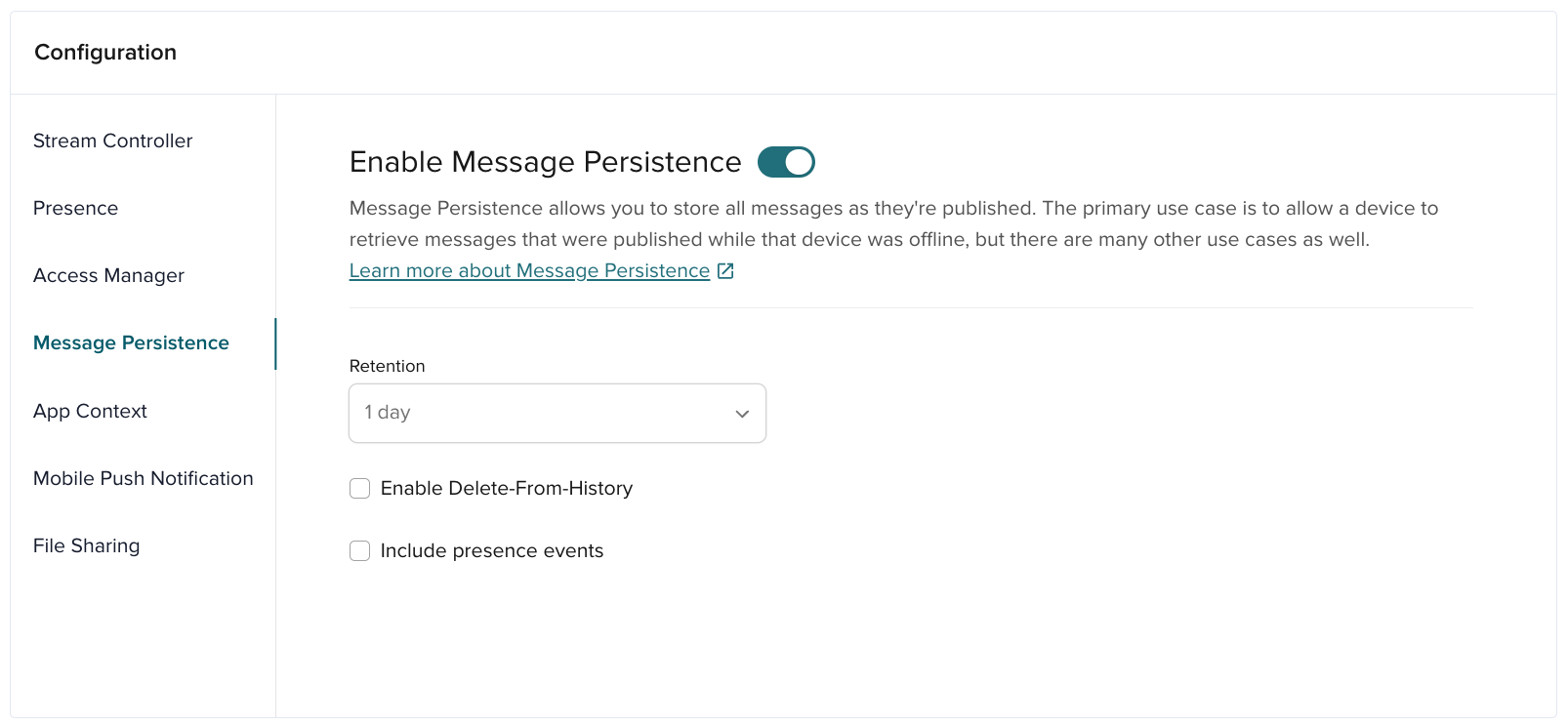
| Option | Description |
|---|---|
| Retention | How long messages are saved. Free accounts support 1 day or 7 days. Paid accounts support higher limits. Align message retention with your File Sharing settings to keep messages and files for the same duration. |
| Enable Delete-From-History | A setting that lets you use API calls to delete specific messages previously stored in a channel's message history. |
| Include presence events | Includes Presence events in saved history so you can track them later. |
Message retention
To retain a message, make sure Message Persistence is enabled for the target keyset in the Admin Portal. You may also configure the retention duration, enable Delete-From-History, and choose whether to retain Presence events. Once configured, Message Persistence is enabled for all channels in the keyset.
Immutable message retention
Retention settings apply to future messages only. When you update Message Persistence retention, existing messages keep their original retention period. New messages use the updated retention period.
Per-message TTL overrides set at publish time are also fixed. If your keyset is configured for Unlimited retention, a per-message TTL is ignored and the message is stored indefinitely.
Retrieve messages
Use the Message Persistence API to retrieve messages quickly. Get up to 100 for one channel, or 25 across up to 500 channels, in one request.
The Message Persistence API returns regular messages, file messages, and message actions. The messageType and custom_message_type values indicate the PubNub type (integer) and your custom type (string). Use these values to tag messages (text, signals, files) and later filter or group them.
Message Persistence enables retrieval of three data types stored in PubNub channels: messages, message actions, and file messages.
| Message Type | Description | Saved in Message Persistence |
|---|---|---|
| 0 | Regular message | Yes |
| 1 | Signal | No |
| 2 | App Context event | No |
| 3 | Message Actions event | Yes |
| 4 | File message | Yes |
Retrieving message actions
Retrieve messages with their actions, or retrieve only the actions. See Retrieve Actions for details.
Use start and end timetokens to get a time range. For multi‑channel requests, 25 is the default and maximum.
To fetch missed messages, provide only end with the last received timetoken. The example below retrieves the last 25 messages on two channels.
- JavaScript
- Swift
- Objective-C
- Java
- C#
- Python
1pubnub.fetchMessages(
2  {
3    channels: ["chats.room1", "chats.room2"],
4    end: '15343325004275466',
5    count: 25 // default/max is 25 messages for multiple channels (up to 500)
6  },
7  function(status, response) {
8    console.log(status, response);
9  }
10);
1pubnub.fetchMessageHistory(
2  for: ["chats.room1", "chats.room2"],
3  end: "15343325004275466"
4) { result in
5  switch result {
6    case let .success(response):
7      print("Successful History Fetch Response: \(response)")
8

9    case let .failure(error):
10      print("Failed History Fetch Response: \(error.localizedDescription)")
11  }
12}
1self.pubnub.history()
2  .channels(@[@"chats.room1", @"chats.room2"])
3  .end(15343325004275466).limit(25)
4  .performWithCompletion(^(PNHistoryResult *result, PNErrorStatus *status) {
5    // handle returned messages in result
6});
1pubNub.fetchMessages()
2 .channels(Arrays.asList("ch1", "ch2", "ch3"))
3 .async(result -> {
4 result.onSuccess(res -> {
5 final Map<String, List<PNFetchMessageItem>> channelToMessageItemsMap = res.getChannels();
6 final Set<String> channels = channelToMessageItemsMap.keySet();
7 for (final String channel : channels) {
8 List<PNFetchMessageItem> pnFetchMessageItems = channelToMessageItemsMap.get(channel);
9 for (final PNFetchMessageItem fetchMessageItem: pnFetchMessageItems) {
10 System.out.println(fetchMessageItem.getMessage());
11 System.out.println(fetchMessageItem.getMeta());
12 System.out.println(fetchMessageItem.getTimetoken());
13 }
14 }
15 }).onFailure(exception -> {
1pubnub.FetchHistory()
2  .Channels(new string[] { "my_channel" })
3  .MaximumPerChannel(25)
4  .End(15343325004275466)
5  .Execute(new PNFetchHistoryResultExt((result, status) => {
6    // handle returned messages in result
7  }));
1envelope = pubnub.fetch_messages()\
2  .channels(["chats.room1", "chats.room2"])\
3  .count(25)\
4  .end(15343325004275466)\
5  .sync()
If you need more than 25 messages, use returned timetokens to page backward and retrieve more. Continue paging through the channel timeline until you have all required messages.
| Parameters Used | Behavior |
|---|---|
start | Retrieves messages before the start timetoken, excluding any message at that timetoken |
end | Retrieves messages after the end timetoken, including any message at that timetoken |
start & end | Retrieves messages between the start and end timetokens, excluding any message at the start timetoken and including any message at the end timetoken |
Convert Unix timestamps to PubNub timetokens with the converter tool.
Filtering retrieved messages
Message Persistence prioritizes low‑latency retrieval. To filter by content, retrieve messages and filter on the client. You can also filter by the type and custom_message_type values to show specific message types that you used previously (for example, vip-chat or intruder-alert). For server‑side search, use an After Publish Function to index messages in your database.
If you store messages in an external database, you can use an After Publish Function to index messages server-side and query them with full flexibility. For a no-code approach to routing messages to external systems, see Events & Actions.
For more information or assistance, contact support.
Delete messages from history
Message Persistence lets you delete messages from history. You can delete messages published between two points in time or delete a specific message.
Deleting messages from history requires SDK clients initialized with the secret key. Each SDK provides different methods. Consult the SDK documentation for reference.
For details on initializing PubNub with a secret key, see Application Configuration.
Effect on usage metrics
Deleting messages does not update usage metrics for past dates. Changes to your stored data volume are reflected in the Admin Portal within 24 hours.
Receive messages and signals
When a message or signal is received by the client, it triggers a message or signal event. Refer to Receive Messages to learn how to act on these events.
How messages are fetched
The following details explain how messages are retrieved from Message Persistence based on the start and end parameters.
Scenario 1
Scenario 1 retrieves messages starting with the message stored before the start timetoken parameter value and continues until it has 25 messages or hits that oldest message (whichever comes first).
| Parameter | Value |
|---|---|
count | 25 |
start | value provided |
end | value not provided |
1Channel Timeline
2oldest-message --------------- start-timetoken --------------- newest-message
3[                   <--------]
Scenario 2
| Parameter | Value |
|---|---|
count | 25 |
start | value not provided |
end | value provided |
1Channel Timeline
2oldest-message --------------- end-timetoken --------------- newest-message
3                               [                    <---------------------]
Scenario 3
| Parameter | Value |
|---|---|
count | 25 |
start | value provided |
end | value provided |
1Channel Timeline
2oldest-message ----- end-timetoken ----------------- start-timetoken ----- newest-message
3                     [      <----------------------]
Get message counts
The Message Count API returns the number of messages sent after a given point in time. You can specify up to 100 channels in a single call.
Rather than retrieving lots of messages from hundreds of channels, you can get the number of missed messages and retrieve the messages later. For example, you can display the unread message count on channels that the client hasn't visited yet and retrieve those messages when the client actually visits the channel.
The Message Count API returns the number of messages sent for each channel greater than or equal to the provided timetoken. You can not specify a time range because it's only intended to give the number of messages since a given timetoken. Optionally, you can specify a different timetoken per channel or one timetoken to be applied to all channels.
Unlimited message retention
For keys with unlimited message retention enabled, this method considers only messages published in the last 30 days.
- JavaScript
- Swift
- Objective-C
- Java
- C#
- Python
1pubnub.messageCounts({
2    channels: ["chats.room1", "chats.room2"],
3    channelTimetokens: ['15518041524300251']
4    }).then((response) => {
5    console.log(response)
6    }).catch((error) => {
7    // handle error
8  }
9);
1pubnub.messageCounts(
2  channels: ["chats.room1", "chats.room2"]),
3  timetoken: 15495750401727535
4) { result in
5  switch result {
6    case let .success(response):
7      print("Successful Message Count Response: \(response)")
8

9    case let .failure(error):
10      print("Failed Message Count Response: \(error.localizedDescription)")
11  }
12}
1self.client.messageCounts().channels(@[@"chats.room1", @"chats.room2"])
2  .timetokens(@[@(15495750401727535)])
3  .performWithCompletion(^(PNMessageCountResult *result, PNErrorStatus *status) {
4

5    if (!status.isError) {
6      // Client state retrieved number of messages for channels.
7    }
8    else {
9      // handler error condition
10    }
11  });
1pubnub.messageCounts()
2    .channels(Arrays.asList("chats.room1", "chats.room2"))
3    .channelsTimetoken(Arrays.asList(15495750401727535L))
4    .async(result -> {
5        result.onSuccess(res -> {
6            for (Map.Entry<String, Long> entry : res.getChannels().entrySet()) {
7                entry.getKey(); // the channel name
8                entry.getValue(); // number of messages for that channel
9            }
10        }).onFailure(exception -> {
11            exception.printStackTrace();
12        });
13    });
1pubnub.MessageCounts()
2  .Channels(new string[] { "chats.room1", "chats.room2" })
3  .ChannelsTimetoken(new long[] { 15495750401727535 })
4  .Execute(new PNMessageCountResultExt((result, status) => {
5    if (status != null && status.Error)
6    {
7      Console.WriteLine(status.ErrorData.Information);
8    }
9    else
10    {
11      Console.WriteLine(pubnub.JsonPluggableLibrary.SerializeToJsonString(result));
12    }
13  }));
1envelope = pubnub.message_counts()\
2  .channel("chats.room1", "chats.room2") \
3  .channel_timetokens([15495750401727535])
4  .sync()
5

6print(envelope.result.channels)