Access control and permissions management
Access Manager v2 is deprecated
This documentation describes Access Manager v3.
If you use Access Manager in v2, migrate to the latest version (v3).
Access Manager is an optional add-on that lets you control who can read from or write to your PubNub channels and user metadata. Without it, any client with your keys has unrestricted access to all resources on that keyset.
Access Manager (v3) is a token‑based access control system for PubNub resources: channels, channel groups, and user IDs. You can make a 1:1 chat private by allowing only two users to read and write. You can also make a channel public by granting access to all users. You can define many permissions in one API call by listing resources or using regular‑expression patterns.
DataSync extends the same tokens with resource types of its own, so one grant can cover messaging, App Context metadata, and DataSync objects together. Refer to DataSync access control.
User ID / UUID
User ID is also referred to as UUID/uuid in some APIs and server responses but holds the value of the userId parameter you set during initialization.
Access Manager is optional but recommended
Access Manager is an optional add-on you enable per keyset in the Admin Portal. It's not enabled by default.
Without Access Manager, PubNub resources on this keyset have no access controls. Any client that connects can reach channels and metadata without permission checks — including Publish, Subscribe, Presence, and all other PubNub operations.
Enable Access Manager when your app requires:
- Private or restricted channels, such as 1:1 chat, group DMs, or member-only spaces.
- User-scoped permissions, to bind tokens to a specific User ID so only that user can consume them.
- Sensitive data handling, any channel carrying personal, financial, or health information.
- Regulatory compliance, HIPAA, SOC 2, GDPR, or similar requirements that mandate access control.
If your app streams public, non-sensitive data with no user authentication (for example, a live sports scoreboard), you may not need Access Manager. For all other production scenarios, enabling it is strongly recommended.
Apps that use Access Manager create user tokens with individual permissions. PubNub generates these tokens. The client gets a token from your server and sends it with each PubNub API request.
Accepted tokens
Access Manager uses PubNub‑generated cryptographic tokens to define permissions for channels, groups, and metadata. External tokens (such as JWTs) aren’t supported.
Configuration
Enable Access Manager for your app’s keyset in the Admin Portal.
Public Admin Portal demo
Want to browse through the Admin Portal without creating an account? Explore it through the Public Demo that shows examples of most PubNub features for transport and logistics use case.
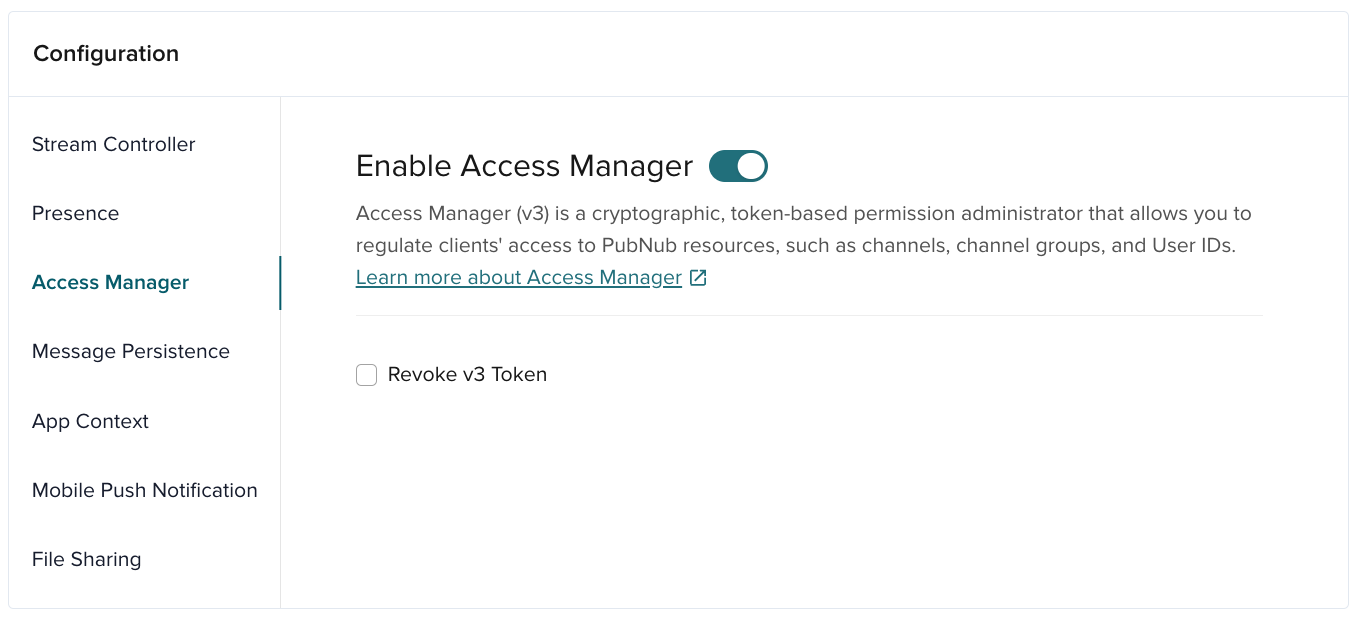
| Option | Description |
|---|---|
| Revoke v3 Token | Invalidate a token so it can’t authenticate access to PubNub resources. |
Verify Access Manager status programmatically
To check whether Access Manager is enabled for a keyset:
- Make a Publish, Subscribe, or History call without a secret key or auth token. A
403response means Access Manager is enabled; a successful response means it is not. - Query the Admin Portal REST API and check whether
ulsistruein the keyset configuration.
Authorization flow
Three actors participate in the authorization process:
-
Server - A centralized server manages access. Only the server can request grants with the
secretKey. Expose an API so clients can get new or updated tokens. Use the server to validate logins, set permissions, and specify theauthorized_uuid. -
Client device - A client runs on one device. It requests a token from the server, sets it as the
authKey, and uses it for API calls to channels, channel groups, and user ID metadata. The client refreshes the token before it expires. -
PubNub - PubNub provides APIs for both servers and clients. Servers call the grant API to generate or refresh tokens. Clients pass tokens with requests (publish, subscribe). PubNub validates that the user has the required permissions.
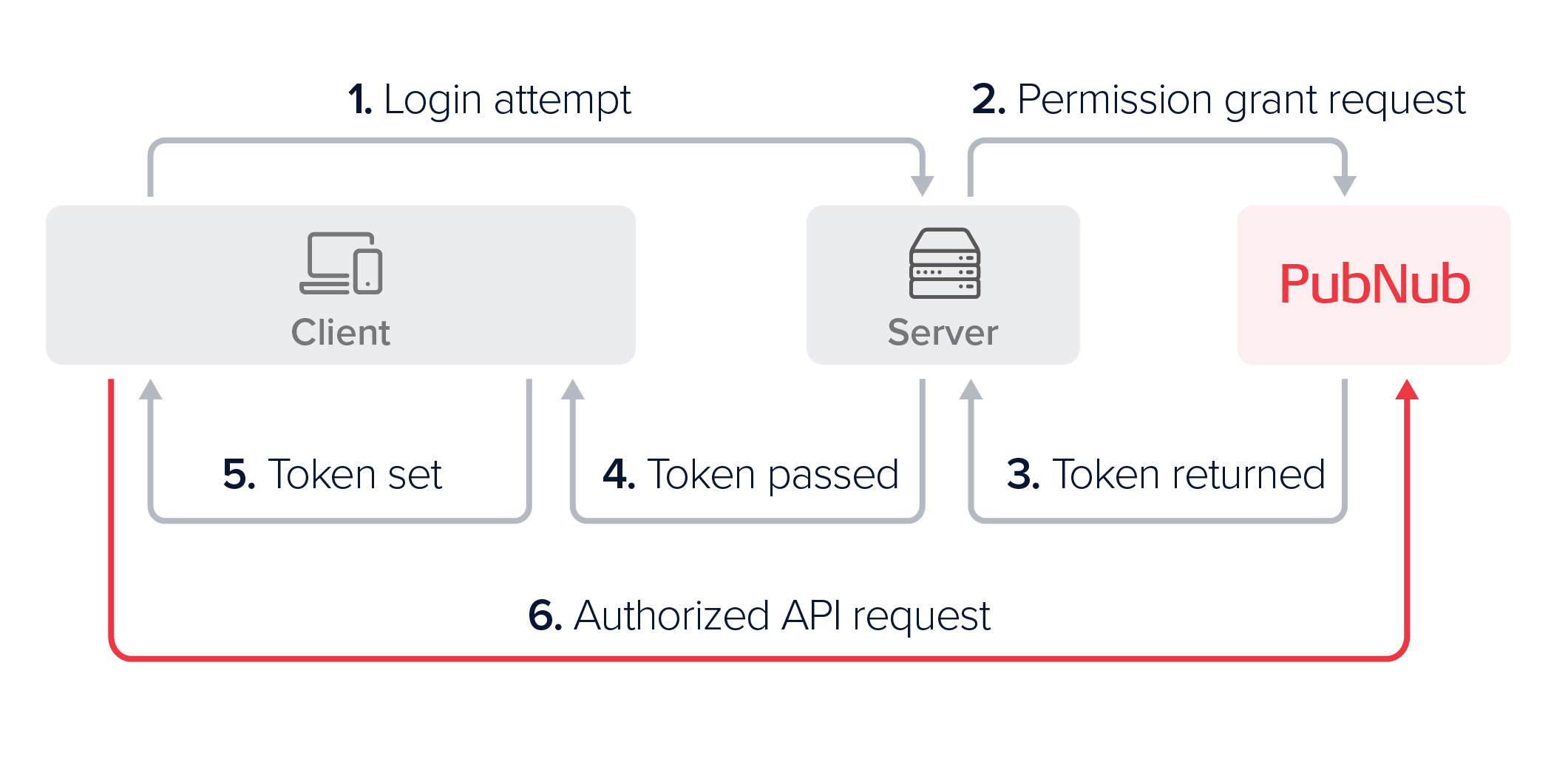
A typical client authorization could look as follows:
-
Upon login, the client requests authorization.
-
The server uses the
secretKeyto request a token with the needed permissions for the authorized User ID. -
PubNub returns a signed, time‑limited token.
-
The server returns the token to the client.
-
The client sets the token (the
authKey) in the SDK configuration. -
The client uses the token for API calls until it expires or is revoked, then requests a new token.
This flow ensures only authorized users access specific PubNub resources.
Server-side operations
Once your server can grant tokens, clients use those tokens securely.
Use a centralized server that initializes a server‑side PubNub SDK with a secretKey. Only the server can request permission grants.
Initialize with a secret key
The secretKey lets you give clients access to PubNub resources, change access levels, and remove permissions. When you initialize PubNub with the secretKey, you get root permissions for Access Manager. Servers get read and write access to all resources, so you do not need to grant extra access for server calls.
The following operations require the secretKey and must only be called from your server:
grantToken()— issue a v3 access token with embedded permissionsrevokeToken()— add a token to the deny list
Your trusted backend server can also use the secretKey directly for standard operations such as Publish. Never expose the secretKey to clients — clients must always use tokens issued by your server via grantToken(). Clients do not call grantToken() themselves.
Paid plans support secret key rotation. It manages and expires up to five keys, including the current key.
Secret key security
Use the secretKey only on a secure server. Never expose it to client devices. If it is compromised, regenerate it in the Admin Portal.
- Node.js
- Python
- Java
- Kotlin
- Go
- C#
- Dart
- PHP
- Ruby
1const pubnub = new PubNub({
2    subscribeKey: "mySubscribeKey",
3    publishKey: "myPublishKey",
4    secretKey: "mySecretKey",
5    userId: "myUniqueUserId"
6  });
1pn_config = PNConfiguration()
2pn_config.subscribe_key = "my_subscribe_key"
3pn_config.publish_key = "my_publish_key"
4pn_config.secret_key = "my_secret_key"
5pn_config.user_id = "my_unique_user_id"
6pubnub = PubNub(pn_config)
1PNConfiguration.Builder configBuilder = PNConfiguration.builder(new UserId("yourUserId"), "yourSubscribeKey");
2// publishKey from Admin Portal (only required if publishing)
3configBuilder.publishKey("PublishKey");
4configBuilder.secretKey("mySecretKey");
5PubNub pubNub = PubNub.create(configBuilder.build());
1val pnConfiguration = PNConfiguration(UserId("myUserId")).apply {
2    subscribeKey = "my_subkey"
3    publishKey = "my_pubkey"
4    secretKey = "my_secretkey"
5    secure = true
6  }
1pnconfig := pubnub.NewConfig()
2  pnconfig.SubscribeKey = "MySubscribeKey"
3  pnconfig.PublishKey = "MyPublishKey"
4  pnconfig.SecretKey = "MySecretKey"
5  pnconfig.SetUserId(UserId("myUniqueUserId"))
6  pn := pubnub.NewPubNub(pnconfig)
1PNConfiguration pnconfig = new PNConfiguration();
2pnconfig.SubscribeKey = "mySubscribeKey";
3pnconfig.PublishKey = "myPublishKey";
4pnconfig.SecretKey = "mySecretKey";
5pnconfig.UserId = "MyUniqueUserId";
6Pubnub pubnub = new Pubnub(pnconfig);
1final myKeyset = Keyset(
2  subscribeKey: 'mySubscribeKey',
3  publishKey: 'myPublishKey',
4  secretKey: 'mySecretKey',
5  userId: UserId('yourUniqueUserId')
6  );
1use PubNub\PNConfiguration;
2$pnConfiguration = new PNConfiguration();
3$pnConfiguration->setSubscribeKey("MySubscribeKey");
4$pnConfiguration->setPublishKey("MyPublishKey");
5$pnConfiguration->setSecretKey("MySecretKey");
6$pnConfiguration->setUserId("MyUniqueUserId");
1pubnub = Pubnub.new(
2    subscribe_key: 'my_subscribe_key',
3    publish_key: 'my_publish_key',
4    secret_key: 'my_secret_key',
5    user_id: 'myUniqueUserId'
6);
Grant permissions
PubNub enforces access with time‑limited grant tokens.
After you enable Access Manager, call PubNub to grant a token. Specify the authorized User ID, the resource permissions (lists or RegEx), and the ttl (Time To Live).
An authorized User ID can have permissions for:
- Channels
- Channel groups
- User IDs (
uuids), which are other users' App Context metadata, such as their names or avatars - Users (
users), which are DataSyncUserobjects - DataSync entities, relationships, and memberships
Once the grant is successful, the server responds to the client device's authentication request by returning a token with embedded permissions.
note
users for DataSync, uuids for App Contextusers and uuids both take a User ID, but they are separate scopes that different products read. Grant users for DataSync User objects. Grant uuids for App Context user metadata, which is what the examples on this page use. A token that grants only uuids does not authorize DataSync operations on the matching user.
A single grant carries one name from the pair, never both. The check spans the whole request, so resources.users can't be paired with patterns.uuids either. authorizedUserId and authorized_uuid pair up the same way.
For the DataSync scopes and the field-level projections that go with them, refer to Grant DataSync permissions below.
The code below grants the my-authorized-uuid:
- Read access to
channel-a,channel-group-b, anduuid-c. - Read/write access to
channel-b,channel-c,channel-d, anduuid-d. - Read access to all channels that match the
channel-[A-Za-z0-9]RegEx pattern.
- Node.js
- Python
- Java
- Kotlin
- Go
- C
- C#
- Dart
- PHP
- Ruby
1pubnub.grantToken(
2 {
3 ttl: 15,
4 authorized_uuid: "my-authorized-uuid",
5 resources: {
6 channels: {
7 "channel-a": {
8 read: true
9 },
10 "channel-b": {
11 read: true,
12 write: true
13 },
14 "channel-c": {
15 read: true,
1from pubnub.models.consumer.v3.channel import Channel
2from pubnub.models.consumer.v3.group import Group
3from pubnub.models.consumer.v3.uuid import UUID
4
5channels = [
6 Channel.id("channel-a").read(),
7 Channel.pattern("channel-[A-Za-z0-9]").read(),
8 Channel.id("channel-b").read().write(),
9 Channel.id("channel-c").read().write(),
10 Channel.id("channel-d").read().write()
11]
12channel_groups = [
13 Group.id("channel-group-b").read()
14]
15uuids = [
1pubnub.grantToken()
2    .ttl(15)
3    .authorizedUUID("my-authorized-uuid")
4        .channels(Arrays.asList(
5                ChannelGrant.name("channel-a").read(),
6                ChannelGrant.name("channel-b").read().write(),
7                ChannelGrant.name("channel-c").read().write(),
8                ChannelGrant.name("channel-d").read().write(),
9                ChannelGrant.pattern("^channel-[A-Za-z0-9]*$").read()))
10        .channelGroups(Collections.singletonList(
11                ChannelGroupGrant.id("channel-group-b").read()))
12        .uuids(Arrays.asList(
13                UUIDGrant.id("uuid-c").get(),
14                UUIDGrant.id("uuid-d").get().update()))
15        .async(result -> { /* check result */ });
1pubnub.grantToken(
2 ttl = 15,
3 authorizedUUID = "my-authorized-uuid",
4 channels = listOf(
5 ChannelGrant.name(name = "channel-a", read = true),
6 ChannelGrant.name(name = "channel-b", read = true, write = true),
7 ChannelGrant.name(name = "channel-c", read = true, write = true),
8 ChannelGrant.name(name = "channel-d", read = true, write = true),
9 ChannelGrant.pattern(pattern = "^channel-[A-Za-z0-9]*$", read = true)
10 ),
11 channelGroups = listOf(
12 ChannelGroupGrant.id(id = "channel-group-b", read = true)
13 ),
14 uuids = listOf(
15 UUIDGrant.id(id = "uuid-c", get = true),
1res, status, err := pn.GrantToken().
2 TTL(15).
3 AuthorizedUUID("my-authorized-uuid").
4 Channels(map[string]pubnub.ChannelPermissions{
5 "channel-a": {
6 Read: true,
7 },
8 "channel-b": {
9 Read: true,
10 Write: true,
11 },
12 "channel-c": {
13 Read: true,
14 Write: true,
15 },
1char* author_uuid = "my-authorized-uuid";
2struct pam_permission cha_perm = {.read=true };
3struct pam_permission cgb_perm = {.read=true };
4struct pam_permission uidc_perm = {.get=true };
5
6struct pam_permission chb_perm = {.read=true, .write=true };
7struct pam_permission chc_perm = {.read=true, .write=true };
8struct pam_permission chd_perm = {.read=true, .write=true };
9struct pam_permission uidd_perm = {.get=true, .update=true };
10
11struct pam_permission pat_ch_perm = {.read=true };
12
13int perm_cha = pubnub_get_grant_bit_mask_value(cha_perm);
14int perm_chb = pubnub_get_grant_bit_mask_value(chb_perm);
15int perm_chc = pubnub_get_grant_bit_mask_value(chc_perm);
1PNResult<PNAccessManagerTokenResult> grantTokenResponse = await pubnub.GrantToken()
2 .TTL(15)
3 .AuthorizedUuid("my-authorized-uuid")
4 .Resources(new PNTokenResources()
5 {
6 Channels = new Dictionary<string, PNTokenAuthValues>() {
7 { "channel-a", new PNTokenAuthValues() { Read = true } },
8 { "channel-b", new PNTokenAuthValues() { Read = true, Write = true } },
9 { "channel-c", new PNTokenAuthValues() { Read = true, Write = true } },
10 { "channel-d", new PNTokenAuthValues() { Read = true, Write = true } }},
11 ChannelGroups = new Dictionary<string, PNTokenAuthValues>() {
12 { "channel-group-b", new PNTokenAuthValues() { Read = true } } },
13 Uuids = new Dictionary<string, PNTokenAuthValues>() {
14 { "uuid-c", new PNTokenAuthValues() { Get = true } },
15 { "uuid-d", new PNTokenAuthValues() { Get = true, Update = true } }}
1var request = pubnub.requestToken(
2    ttl: 15, authorizedUUID: 'my-authorized-uuid')
3..add(ResourceType.channel, name: 'channel-a', read: true)
4..add(ResourceType.channelGroup, name: 'channel-group-b', read: true)
5..add(ResourceType.uuid, name: 'uuid-c', get: true)
6..add(ResourceType.channel, name: 'channel-b', read: true, write: true)
7..add(ResourceType.channel, name: 'channel-c', read: true, write: true)
8..add(ResourceType.channel, name: 'channel-d', read: true, write: true)
9..add(ResourceType.uuid, name: 'uuid-d', get: true, update: true)
10..add(ResourceType.channel, pattern: 'channel-[A-Za-z0-9]', read: true);
11

12var token = await pubnub.grantToken(request);
13print('grant token = $token');
1$pubnub->grantToken()
2 ->ttl(15)
3 ->authorizedUuid('my-authorized-uuid')
4 ->addChannelResources([
5 'channel-a' => ['read' => true],
6 'channel-b' => ['read' => true, 'write' => true],
7 'channel-c' => ['read' => true, 'write' => true],
8 'channel-d' => ['read' => true, 'write' => true],
9 ])
10 ->addChannelGroupResources([
11 'channel-group-b' => ['read' => true],
12 ])
13 ->addUuidResources([
14 'uuid-c' => ['get' => true],
15 'uuid-d' => ['get' => true, 'update' => true],
1pubnub.grant_token(
2 ttl: 15,
3 authorized_uuid: "my-authorized-uuid",
4 channels: {
5 "channel-a": Pubnub::Permissions.res(
6 read: true
7 ),
8 "channel-b": Pubnub::Permissions.res(
9 read: true,
10 write: true
11 ),
12 "channel-c": Pubnub::Permissions.res(
13 read: true,
14 write: true
15 ),
Grant DataSync permissions
DataSync grants go through the same grantToken call. You add the users scope for DataSync User objects, a dataSync scope for entities, relationships, and memberships, and an optional dataSyncProjections map that narrows a grant down to individual payload fields.
Both tabs below are JavaScript and grant the same two user records, so you can read the scope names side by side. The App Context tab is the shape the examples earlier on this page use. The DataSync tab swaps uuids for users, then adds the scopes that have no App Context equivalent.
- DataSync (users)
- App Context (uuids)
Grants get on two DataSync users, get and update on one entity, get on every entity matching the product-.* pattern, membership create, get, and delete, and reads and writes limited to the admin projection on product-sneaker-42.
1pubnub.grantToken({
2 ttl: 15,
3 authorizedUserId: "my-authorized-user",
4 resources: {
5 users: {
6 "user-c": {
7 get: true
8 },
9 "user-d": {
10 get: true,
11 update: true
12 }
13 },
14 dataSync: {
15 entities: {
The same two user records granted through uuids, which authorizes App Context user metadata and nothing in DataSync. uuids names the users whose metadata the token can reach, and it is unrelated to authorized_uuid, the single User ID allowed to use the token at all. Refer to Authorized UUID for that distinction, and to the grant examples above for the same call in every SDK.
1pubnub.grantToken({
2    ttl: 15,
3    authorized_uuid: "my-authorized-uuid",
4    resources: {
5        uuids: {
6            "uuid-c": {
7                get: true
8            },
9            "uuid-d": {
10                get: true,
11                update: true
12            }
13        }
14    }
15})
The scopes a DataSync grant can carry:
| Grant scope | Covers | Permissions |
|---|---|---|
users | DataSync User objects | create, get, update, delete |
channels | DataSync Channel objects, alongside the messaging permissions on that channel | the channel permissions listed under Permissions |
dataSync.entities | Entities of the classes you define | create, get, update, delete |
dataSync.relationships | Relationships of the classes you define | create, get, update, delete |
dataSync.memberships | Memberships linking a channel to a user | create, get, update, delete |
dataSyncProjections | Which payload fields the token reads and writes on a given object | a single projection name per id or pattern |
DataSync permissions follow the grant's top-level split: put exact IDs under resources.dataSync and RegEx patterns under patterns.dataSync. dataSyncProjections has its own nested resources and patterns maps for projection assignments. For projections, an exact ID assignment wins over a pattern match.
Tokens don't select event projection channels
DataSync filters each event payload according to the class projection associated with its delivery channel: the object ID channel carries the __default__ view, while __<projection>__<id> carries the named projection's view. A token's dataSyncProjections entry controls API reads and writes, but it doesn't automatically select or authorize an event channel. Control who receives each view with an ordinary channel read grant on that channel. Refer to Projections and events.
For the resource-type mapping, the error codes, and the service limits, refer to DataSync access control.
Token size limits
A token stores all access mappings. As you add permissions, the token grows. Larger tokens increase HTTP request size.
Requests that exceed 32 KiB fail with 414 URI Too Long. To stay within limits:
- Prefer RegEx patterns over long resource lists.
- Keep resource names short and consistent.
See channel naming convention or contact support for help.
TTL
ttl is the number of minutes before granted permissions expire. It is required for every grant. There is no default.
The minimum is 1 (1 minute). The maximum is 43200 (30 days). If you need a higher limit, contact support.
RegEx
You can grant access in a single API call. Use either:
- A single resource or a list of resources the authorized UUID can access.
- A pattern‑based sequence of UUIDs, channels, or channel groups using regular expressions.
Pattern matching for patterns is evaluated on the PubNub server (not by the SDK). Supported syntax is based on RE2: backreferences and lookaround assertions are not supported.
Common wildcard-style patterns using RE2:
| Goal | RE2 pattern | Example match |
|---|---|---|
| All channels with a prefix | chat-.* | chat-general, chat-team-eng |
| All channels with a suffix | .*-public$ | room-public, lobby-public |
| Numeric identifiers | ^room-[0-9]+$ | room-1, room-42 |
| All channels | .* | any channel name |
Difference from Access Manager v2
Access Manager v2 wildcards only matched one dot-level deep — a.* matched a.general but not a.team.eng. RE2 patterns in v3 match the full channel name string, giving you full flexibility. See the migration guide for a full comparison.
To succeed, specify permissions for at least one UUID, channel, or channel group (resource list or pattern).
Authorized UUID
For a higher level of security, you can specify one top-level authorized UUID in the grant payload. When specified, this UUID will be embedded in the token and returned by the grant request. This ensures that any request to PubNub that uses that token has to come from that authorized UUID. Otherwise, PubNub will reject the request and deny access to the resources.
Authorized UUID vs UUIDs
The grant request body contains the uuids key which defines permissions required to access the other UUIDs' (users') metadata. The UUIDs contained within have nothing to do with the UUID authorized to use the token. To allow a UUID to use a particular token, specify this UUID as an authorized one (authorized_uuid). The value of that parameter must be an instance of a preexisting client's UUID that was set during the initialization of its PubNub object. For more information about setting UUIDs, refer to Identity Management.
Per-device access control
To restrict access to a single device, combine authorized_uuid with a device-specific channel name (for example, device-{uuid}). The authorized_uuid ensures the token cannot be reused by another client. The device-specific channel ensures only messages published to that channel reach the device. PubNub does not filter published messages by subscriber — access control is enforced at the subscribe layer.
Change permissions
Apps often change a user's permissions. For example, add or remove a user from a channel. The server requests a new grant and returns the token to the client.
Revoke permissions
Enable token revoke
To revoke tokens, you must first enable this feature on the Admin Portal. To do that, navigate to your app's keyset and mark the Revoke v3 Token checkbox in the ACCESS MANAGER section.
Access Manager lets you revoke a token. Calls that use a revoked token fail with a 403 Revoked Token error. Revoking tokens is useful when you need to remove access quickly.
You can only revoke a valid token previously obtained through a token grant request. Each revoked token is stored in a deny list (usual charges apply) allowing for quick lookup of revoked tokens.
Consider these constraints when revoking tokens:
- You can only enable the token revoke feature if the token
ttlfor the subkey is less than or equal to 30 days. If thatttlvalue doesn't meet your requirements, contact support. - If support changes your token's
ttlto exceed 30 days, you can disable the token revoke functionality, but can't re-enable it using the Admin Portal. To do that, contact support. - You can only revoke one token per one revoke call, batch revokes aren't supported.
- It may take up to 1 minute for the token revoke request to take effect.
- You can't re-enable a revoked token.
- Node.js
- Python
- Java
- Kotlin
- Go
- C#
- Dart
- PHP
- Ruby
1const token = await pubnub.revokeToken("p0AkFl043rhDdHRsple3KgQ3NwY6BDcENnctokenVzcqBDczaWdYIGOAeTyWGJI");
1envelope = pubnub.revoke_token("p0thisAkFl043rhDdHRsCkNyZXisRGNoYW6hanNlY3JldAFDZ3Jwsample3KgQ3NwY6BDcGF0pERjaGFuoENnctokenV")
2    .sync()
1pubnub.revokeToken()
2    .token("p0thisAkFl043rhDdHRsCkNyZXisRGNoYW6hanNlY3JldAFDZ3Jwsample3KgQ3NwY6BDcGF0pERjaGFuoENnctokenV")
3    .sync()
1pubnub.revokeToken("p0thisAkFl043rhDdHRsCkNyZXisRGNoYW6hanNlY3JldAFDZ3Jwsample3KgQ3NwY6BDcGF0pERjaGFuoENnctokenV")
2    .sync()
1res, status, err := pn.RevokeToken()
2    .Token("p0thisAkFl043rhDdHRsCNlY3JldAFDZ3Jwsample3KgQ3NwY6BDENnctokenV")
3    .Execute()
1PNResult<PNAccessManagerRevokeTokenResult> revokeTokenResponse = await pubnub
2    .RevokeToken()
3    .Token("p0thisAkFl043rhDdHRsCkNyZXisRGNoYW6hanNlY3JldAFDZ3Jwsample3KgQ3NwY6BDcGF0pERjaGFuoENnctokenV")
4    .ExecuteAsync();
5PNAccessManagerRevokeTokenResult revokeTokenResult = revokeTokenResponse.Result;
6PNStatus revokeTokenStatus = revokeTokenResponse.Status;
7if (!revokeTokenStatus.Error && revokeTokenResult != null)
8{
9    Console.WriteLine("Revoke token success");
10}
11else
12{
13    Console.WriteLine(pubnub.JsonPluggableLibrary.SerializeToJsonString(revokeTokenStatus));
14}
1await pubnub.revokeToken("p0AkFl043rhDdHRsple3KgQ3NwY6BDcENnctokenVzcqBDczaWdYIGOAeTyWGJI");
1$pubnub->revokeToken("p0thisAkFl043rhDdHRsCkNyZXisRGNoYW6hanNlY3JldAFDZ3Jwsample3KgQ3NwY6BDcGF0pERjaGFuoENnctokenV")
2    ->sync();
1pubnub.revoke_token(token: "p0thisAkFl043rhDdHRsCkNyZXisRGNoYW6hanNlY3JldAFDZ3Jwsample3KgQ3NwY6BDcGF0pERjaGFuoENnctokenV", http_sync: true)
Token caching
PubNub caches tokens for performance. If a token isn’t in the deny list, PubNub caches that state for up to one minute.
If the token was found in the deny list, the system will cache this response for the ttl of the token.
Client-side operations
After the server grants tokens, clients use them as follows.
In general, client applications don't generate tokens, but rather request tokens from server APIs, which handle authentication and permissions logic. The syntax and implementation of these client and server APIs are up to the developer. This section outlines operations that a client may take after getting a token from the centralized server applications.
Initialize with an authKey
When a user logs in, the client sends data to the server. The server validates identity, determines permissions, and specifies the authorized UUID. It generates a token using the secretKey and receives the token (authKey) from PubNub. The server returns the token to the client.
To securely configure client-side access, use the token received from your server. This key ensures clients have the necessary permissions without exposing sensitive information like the secretKey.
Here's how to set up the client SDK with the token:
- JavaScript
- Python
- Swift
- Objective-C
- Go
- Unity
- C#
- Dart
- PHP
- Ruby
1const pubnub = new PubNub({
2  subscribeKey: "mySubscribeKey",
3  publishKey: "myPublishKey",
4  userId: "myUniqueUserId",
5  authKey: "yourAuthKey" // Include the authKey here
6});
1from pubnub.pnconfiguration import PNConfiguration
2from pubnub.pubnub import PubNub
3

4pnconfig = PNConfiguration()
5pnconfig.subscribe_key = "my_subscribe_key"
6pnconfig.publish_key = "my_publish_key"
7pnconfig.user_id = "my_unique_user_id"
8pnconfig.auth_key = "your_auth_key"  # Include the authKey here
9pnconfig.ssl = True
10

11pubnub = PubNub(pnconfig)
1```swift
2import PubNub
3

4let config = PubNubConfiguration(
5  publishKey: "myPublishKey",
6  subscribeKey: "mySubscribeKey",
7  userId: "myUniqueUserId",
8  authKey: "yourAuthKey"  // Include the authKey here
9)
10

11let pubnub = PubNub(configuration: config)
1#import <PubNub/PubNub.h>
2

3// Set up the PubNub configuration
4PNConfiguration *config = [PNConfiguration configurationWithPublishKey:@"myPublishKey"
5                                                           subscribeKey:@"mySubscribeKey"
6                                                                 userID:@"myUniqueUserId"];
7config.authKey = @"yourAuthKey"; // Include the authKey here
8

9// Initialize the PubNub client
10self.client = [PubNub clientWithConfiguration:config];
1package main
2

3import pubnub "github.com/pubnub/go"
4

5func main() {
6    config := pubnub.NewConfigWithUserId("myUniqueUserId")
7    config.SubscribeKey = "mySubscribeKey"
8    config.PublishKey = "myPublishKey"
9    config.AuthKey = "yourAuthKey" // Include the authKey here
10    config.Secure = true
11

12    pn := pubnub.NewPubNub(config)
13    // Now you can use `pn` to interact with PubNub services
14}
1using PubnubApi;
2
3public class PubNubSetup
4{
5 public void InitializePubNub()
6 {
7 // Initialize the PNConfiguration with a unique UserId
8 PNConfiguration pnConfiguration = new PNConfiguration(new UserId("myUniqueUserId"));
9
10 // Set the SubscribeKey and PublishKey from Admin Portal
11 pnConfiguration.SubscribeKey = "mySubscribeKey";
12 pnConfiguration.PublishKey = "myPublishKey";
13
14 // Include the AuthKey here
15 pnConfiguration.AuthKey = "yourAuthKey";
1using PubnubApi;
2
3public class PubNubSetup
4{
5 public void InitializePubNub()
6 {
7 // Initialize the PNConfiguration with a unique UserId
8 PNConfiguration pnConfiguration = new PNConfiguration(new UserId("myUniqueUserId"));
9
10 // Set the SubscribeKey and PublishKey from Admin Portal
11 pnConfiguration.SubscribeKey = "mySubscribeKey";
12 pnConfiguration.PublishKey = "myPublishKey";
13
14 // Include the AuthKey here
15 pnConfiguration.AuthKey = "yourAuthKey";
1import 'package:pubnub/pubnub.dart';
2
3void main() {
4 // Create a keyset with the required parameters
5 final myKeyset = Keyset(
6 subscribeKey: 'mySubscribeKey',
7 publishKey: 'myPublishKey',
8 authKey: 'yourAuthKey', // Include the authKey here
9 userId: UserId('myUniqueUserId'),
10 );
11
12 // Initialize the PubNub instance with the keyset
13 final pubnub = PubNub(defaultKeyset: myKeyset);
14
15 // You can now use `pubnub` to interact with PubNub services
1<?php
2
3use PubNub\PNConfiguration;
4use PubNub\PubNub;
5
6// Create a PNConfiguration with a unique UserId
7$pnConfiguration = new PNConfiguration();
8$pnConfiguration->setSubscribeKey("mySubscribeKey");
9$pnConfiguration->setPublishKey("myPublishKey");
10$pnConfiguration->setUserId("myUniqueUserId");
11$pnConfiguration->setAuthKey("yourAuthKey"); // Include your authKey here
12$pnConfiguration->setSecure(true); // Use SSL
13
14// Initialize the PubNub instance with the configuration
15$pubnub = new PubNub($pnConfiguration);
1require 'pubnub'
2

3# Initialize the PubNub client with the necessary parameters
4pubnub = Pubnub.new(
5    subscribe_key: 'mySubscribeKey',
6    publish_key: 'myPublishKey',
7    user_id: 'myUniqueUserId',
8    auth_key: 'yourAuthKey', # Include your authKey here
9    ssl: true # Use SSL
10)
11

12# You can now use `pubnub` to interact with PubNub services
Check permissions
Access Manager v3 allows you to decode your permissions by parsing a token. You don't need a secretKey to request token details.
Use this method whenever you want to:
- Debug an issue to diagnose the reason for a failing request that returns a
403. - Inspect privileges embedded in the token to check if you have access to a given resource.
Request token details:
- JavaScript
- Python
- Java
- Kotlin
- Swift
- Objective-C
- Go
- C
- Unity
- C#
- Dart
- PHP
- Ruby
1pubnub.parseToken("yourToken")
1pubnub.parse_token("your_token")
1pubnub.parseToken("yourToken")
1pubnub.parseToken("yourToken")
1pubnub.parse(token: "yourToken")
1PNPAMToken *token = [self.client parseAuthToken:@"yourToken"];
2NSLog(@"Token permissions: %@", token);
1pubnub.ParseToken("YourToken") // Given the "pubnub" package is imported: import (pubnub "github.com/pubnub/go/v5")
1char* cbor_data = pubnub_parse_token(<pubnub_context>, "yourToken");
1pubnub.ParseToken("yourToken")
1pubnub.ParseToken("yourToken")
1pubnub.parseToken("yourToken")
1$pubnub->parseToken("yourToken");
1pubnub.parse_token("yourToken")
See a sample response:
1{
2 "version":2,
3 "timestamp":1629394579,
4 "ttl":15,
5 "authorized_uuid": "user1",
6 "resources":{
7 "uuids":{
8 "user1":{
9 "read":false,
10 "write":false,
11 "manage":false,
12 "delete":false,
13 "get":true,
14 "update":true,
15 "join":false
DataSync scopes in a decoded token
The response above is a token granted for channels, channel groups, and uuids. A token that also carries users or DataSync permissions decodes them under resources.users and resources.dataSync, with its projections under meta on the pn-projections key. Each of those keys appears only when the grant actually set it, so guard the access when you read one.
Request a new token
When a client makes an API request using a token that has expired or has been revoked, PubNub API will respond with the 403 Token is expired or 403 Token revoked error message. To renew access, the client should include the logic that prompts the server to request a new token to be generated by PubNub. The authorization flow looks similar to the already described login example. In both cases the server first includes the application-specific logic to validate that the request came from an authorized client, and then makes a PubNub token grant request:
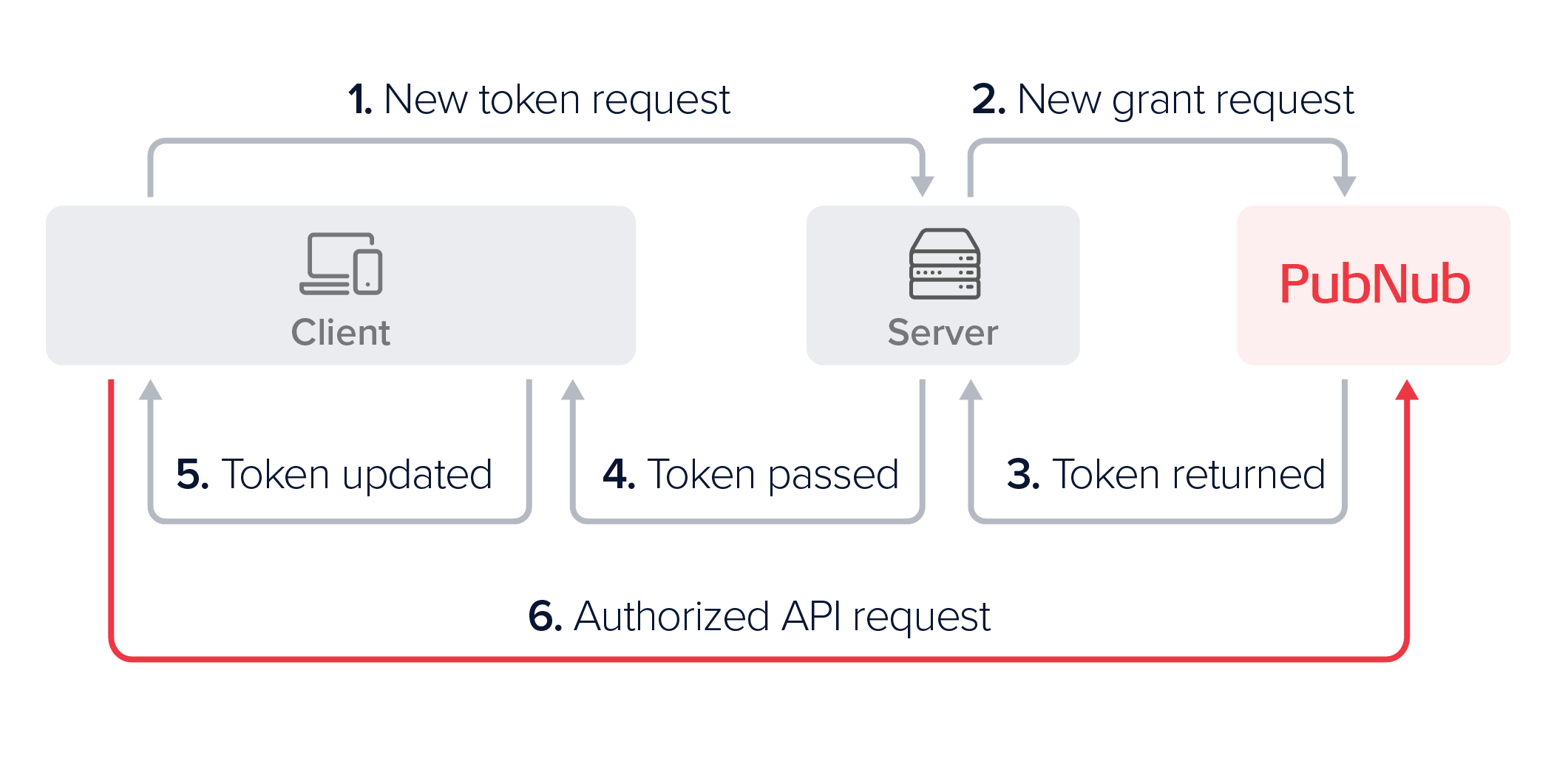
After either a login or a token refresh request from the client, the server passes the newly generated token back to the client device, which then needs to update its configuration and set the new token. Refer to the Token expiration for more information.
- JavaScript
- Python
- Java
- Kotlin
- Swift
- Objective-C
- Go
- C
- Unity
- C#
- Dart
- PHP
- Ruby
1pubnub.setToken("newToken")
1pubnub.set_token("new_token")
1pubnub.setToken("newToken")
1pubnub.setToken("newToken")
1pubnub.set(token: "newToken")
1[self.client setAuthToken:@"NewToken"];
1pn.SetToken("NewToken")
1pubnub.pubnub_set_token(<pubnub_context>, "NewToken")
1pubnub.SetToken("newToken")
1pubnub.SetAuthToken("newToken")
1pubnub.setToken("newToken")
1$pubnub->setToken("newToken");
1pubnub.set_token("newToken")
Token expiration
PubNub checks the token on every authenticated request. Each token has a ttl. When it expires, replace the token.
Using an expired token
If the client sends an expired token, the PubNub server will return a 403 with a respective error message. When you set a new token, calling pubnub.reconnect() (name may vary across SDKs) is necessary.
Update a valid token
To change or extend access to resources, grant a new token with modified permissions.
To address the token expiration effectively, we recommend that you implement one of the following token refresh strategies:
-
The server maintains a list of expiry times, automatically refreshes soon-to-be-stale tokens, and proactively sends the new token to the clients. Clients should respond to these updates by updating the token in the SDK.
-
The client checks the
ttlwhenever it receives a token and sets a timer to make a refresh request. The server supports a refresh API. -
The client supports the logic that handles
403responses, makes a just-in-time token request, updates the SDK upon getting a new token, reconnects, and retries the request that fails.
The following example illustrates strategy 2 — a client-side timer that proactively requests a new token before expiry:
1function scheduleTokenRefresh(token) {
2 const { timestamp, ttl } = pubnub.parseToken(token);
3
4 // ttl is in minutes; timestamp is Unix seconds
5 const ttlMs = ttl * 60 * 1000;
6 const refreshAt = ttlMs * 0.8; // refresh at 80% of TTL elapsed
7
8 setTimeout(async () => {
9 const newToken = await fetchTokenFromYourServer();
10 pubnub.setToken(newToken);
11 scheduleTokenRefresh(newToken); // reschedule for the new token
12 }, refreshAt);
13}
14
15// Call once after the client receives its initial token
Adapt fetchTokenFromYourServer() to your server's token API. Apply exponential backoff if the server is temporarily unavailable.
Update an expired token
The steps to update a token that is past its ttl are similar to updating a valid token with a few exceptions. When your application tries to authenticate using an expired token, PubNub returns an HTTP 403 error, the request isn't retried automatically, and you must reconnect to PubNub.
To update an expired token, we recommend that your token refresh strategy covers the following steps:
-
The client requests a new token from the server and sets it using the
pubnub.setToken()method (name may vary across SDKs). -
Once the new token is set, the client reconnects to PubNub.
-
The client retries the failed request.
Permissions
Access Manager v3 grants permissions for these resources. The table lists the allowed flags for each resource:
| Resource | Available Permissions |
|---|---|
| Channel | read, write, delete, get, update, manage, join |
| Channel Group | read, manage |
| UUID Metadata | get, update, delete |
| Users | create, get, update, delete |
| DataSync Entities | create, get, update, delete |
| DataSync Relationships | create, get, update, delete |
| DataSync Memberships | create, get, update, delete |
Operations to permissions mapping
The following tables show the mappings of API operations to resources and permissions.
Chat SDK method to required Access Manager permission mapping
For information about which Chat SDK methods require what Access Manager permissions, refer to Security and permissions.
Pub/Sub
| PubNub Operation | Resource | Permission |
|---|---|---|
| Publish on channel | Channel | Write |
| Signal on channel | Channel | Write |
| Subscribe to channel | Channel | Read |
| Subscribe to presence channel | Presence Channel (-pnpres) | Read |
| Subscribe to channel group | Channel Group | Read |
| Subscribe to presence channel group | Presence Channel Group (-pnpres) | Read |
| Unsubscribe from channel | Channel | None required |
| Unsubscribe from channel group | Channel Group | None required |
Presence
| PubNub Operation | Resource | Permission |
|---|---|---|
| Here Now | Channel | Read |
| Where Now | Channel | None required |
| Get State | Channel | Read |
| Set State | Channel | Read |
Using hereNow() with Access Manager v3
Grant read on the channel server-side, then call hereNow() client-side:
1// Server: issue a token with read on the target channel
2const token = await pubnub.grantToken({
3  ttl: 60,
4  authorized_uuid: "client-uuid",
5  resources: { channels: { "lobby": { read: true } } }
6});
7

8// Client: set the token, then call hereNow
9pubnub.setToken(token);
10const result = await pubnub.hereNow({ channels: ["lobby"] });
To use hereNow() across multiple channels, include each channel in resources, or use a pattern such as lobby-.*.
Message Persistence
| PubNub Operation | Resource | Permission |
|---|---|---|
| History - Fetch Messages | Channel | Read |
| Message Counts | Channel | Read |
| Delete Messages | Channel | Delete |
File sharing
| PubNub Operation | Resource | Permission |
|---|---|---|
| Send file on channel | Channel | Write |
| List files | Channel | Read |
| Download file | Channel | Read |
| Delete file | Channel | Delete |
Channel groups
| PubNub Operation | Resource | Permission |
|---|---|---|
| Add Channels to channel group | Channel Group | Manage |
| Remove Channels from channel group | Channel Group | Manage |
| List Channels in channel group | Channel Group | Read |
| Remove channel group | Channel Group | Manage |
App Context
| PubNub Operation | Resource | Permission |
|---|---|---|
| Set user metadata | UUID | Update |
| Delete user metadata | UUID | Delete |
| Get user metadata | UUID | Get |
| Get all user metadata | UUID | Managed by the Disallow Get All User Metadata option in the App Context configuration on the Admin Portal.When this option is unchecked, and Access Manager is enabled in an app, you can get metadata of all users without the need to define that in the permissions schema included in the authentication token. |
| Set channel metadata | Channel | Update |
| Delete channel metadata | Channel | Delete |
| Get channel metadata | Channel | Get |
| Get all channel metadata | Channel | Managed by the Disallow Get All Channel Metadata option in the App Context configuration on the Admin Portal.When this option is unchecked, and Access Manager is enabled in an app, you can get metadata of all channels without the need to define that in the permissions schema included in the authentication token. |
| Set channel members | Channel | Manage |
| Remove channel members | Channel | Manage |
| Get channel members | Channel | Get |
| Set channel memberships | Channel, UUID | Channels: Join UUID: Update |
| Remove channel memberships | Channel, UUID | Channels: Join UUID: Update |
| Get channel memberships | UUID | Get |
DataSync
| PubNub Operation | Resource | Permission |
|---|---|---|
| Create DataSync user | Users | Create |
| Get or list DataSync users | Users | Get |
| Replace or patch DataSync user | Users | Update |
| Delete DataSync user | Users | Delete |
| Get or list DataSync channels | Channel | Get |
| Replace or patch DataSync channel | Channel | Update |
| Delete DataSync channel | Channel | Delete |
| Create DataSync entity | DataSync Entities | Create |
| Get or list DataSync entities | DataSync Entities | Get |
| Replace or patch DataSync entity | DataSync Entities | Update |
| Delete DataSync entity | DataSync Entities | Delete |
| Create relationship or membership | DataSync Relationships, DataSync Memberships | Create |
| Get or list relationships or memberships | DataSync Relationships, DataSync Memberships | Get |
| Replace or patch relationship or membership | DataSync Relationships, DataSync Memberships | Update |
| Delete relationship or membership | DataSync Relationships, DataSync Memberships | Delete |
| Subscribe to a DataSync object's events | Channel | Read |
| Subscribe to a projection's events | Channel (__<projection>__<id>) | Read |
DataSync channel objects authorize against the channels resource rather than a dataSync scope, the same resource that gates messaging on that channel. Note that reading one is get, not read: read on a channel governs subscribing, which is how you receive that object's events. Refer to DataSync access control for the full resource-type mapping, and to Projections for field-level access.
Mobile Push Notifications
| PubNub Operation | Resource | Permission |
|---|---|---|
| Register channel for push | Channel | Read |
| Remove channel's push registration | Channel | Read |
Message Actions
| PubNub Operation | Resource | Permission |
|---|---|---|
| Add Message Action | Channel | Write |
| Remove Message Action | Channel | Delete |
| Get Message Actions | Channel | Read |
| Get History with Actions | Channel | Read |