Plans and billing
The Plans and billing page is the central place for your payment, pricing, and support plan data.
Invoices and costs
To see your current and previous month’s invoices, go to the Invoices and costs tab. Use it to compare with previous months.
This section has two views:
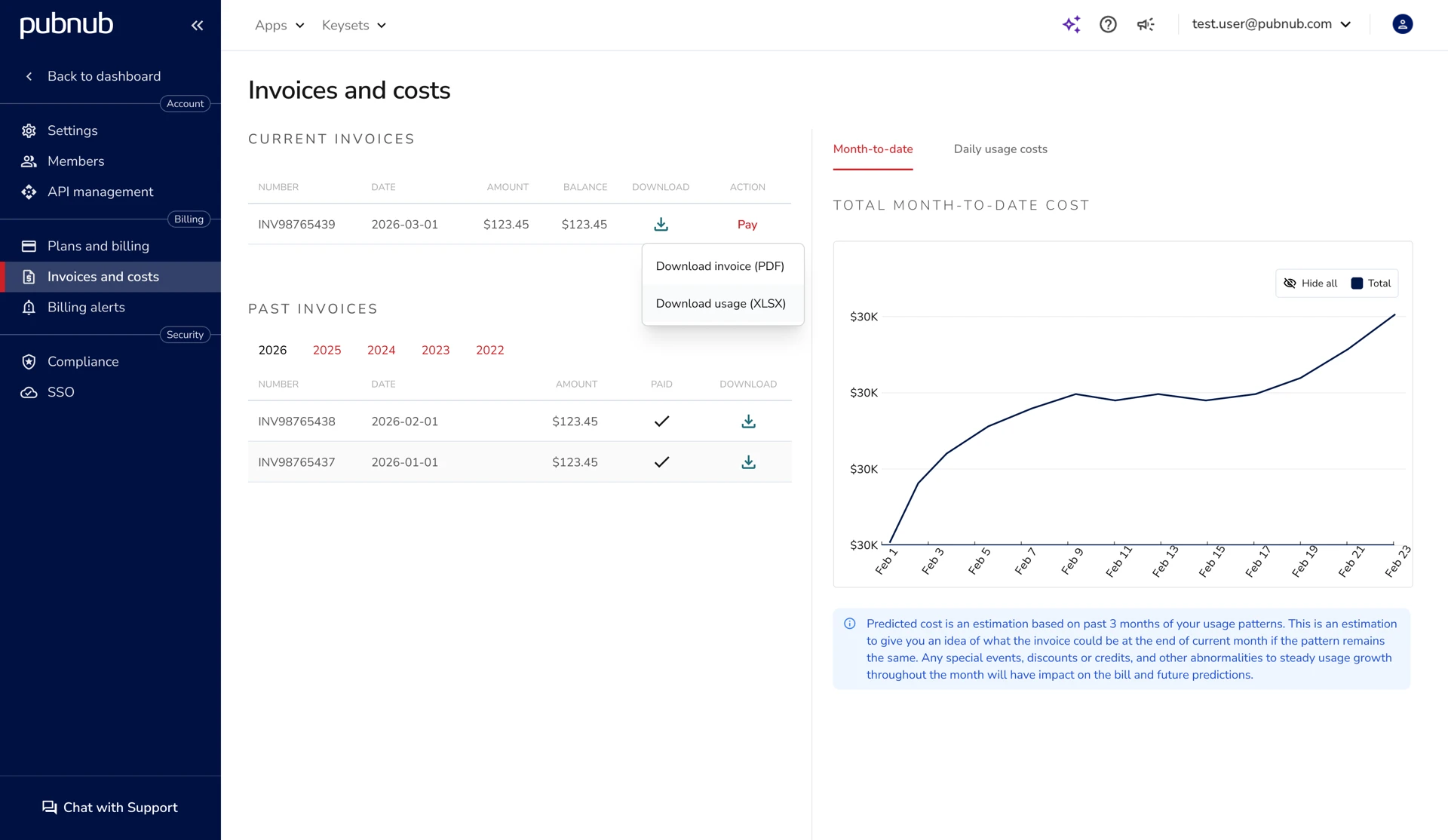
Current and past invoices
See paid and unpaid invoices on the left side of the page. If you paid part of an invoice, you also see the remaining amount.
You can download a PDF of the invoice or an XLSX of the invoice usage details.
-
Invoice PDF includes a summary of charges for the billing period, including plan fees, billable usage totals, applicable taxes, credits, and the final amount due.
-
Usage XLSX includes a detailed breakdown of the billable usage that contributed to the invoice totals, organized by account, app, and subscribe key. See Invoice Usage Details for more information.
Availability
Invoice Usage Details (XLSX) files are available only for invoices generated starting October 2025.
Month-to-date/Daily breakdown
This section displays two graphs. The first shows costs to date by month or by day. The second shows a breakdown by enabled PubNub features (for example, Function Execution).
These graphs help you see whether the current month is close to, below, or above the average of previous months.
Cost predictions
The Total month-to-date cost chart shows the estimated invoice amount at the end of the current month.
PubNub calculates predicted costs from the past three months of usage. You see an estimate for month end if traffic stays similar.
Availability
The predicted cost line on the chart only appears for paid accounts that have at least three months of traffic data available.
Predictions get more accurate as the month progresses. Mid‑month, 85% of predictions exceed 90% accuracy. Spikes, discounts, or credits that deviate from recent usage patterns can affect results.
For best prediction results, use a monthly billing period.
Invoice usage details
Invoice Usage Details provides a breakdown of the monthly usage data used to calculate a specific invoice. The downloaded XLSX file contains billing-relevant metrics for the invoice period – only metrics used to calculate the invoice – and groups metrics by account, app, and subscribe key.
Available for invoices generated starting October 2025.
The Excel file contains multiple worksheets that provide different views of invoice-related usage. The worksheets shown depend on the customer's plan and enabled features.
All worksheets group usage by:
- Account
- App
- Subscribe key
The file includes:
- Daily worksheet – Displays daily billable usage for the invoice period. This includes the primary usage metrics that appear on the invoice.
- Transaction worksheets – Display monthly totals for billable transaction categories and the usage metrics that roll up into those invoice totals (categories vary by plan).
- Functions, Persistence, and Events Ingested (E&A) – Monthly totals where applicable.
- Zero Counts worksheet – Lists apps and subscribe keys with no usage during the invoice period.